Azure OpenAI PTU vs PAYG: The Real Break-Even Table
Break-even calculators say PTU wins at 150M tokens per month. Real-world utilization breaks that math. Here is the actual table from Microsoft's PTU throughput data, with the utilization curve most architects miss.

Every Azure OpenAI cost calculator on the internet tells you the same thing. PTU breaks even at roughly 150 to 200 million tokens per month for GPT-5. Below that volume, pay-as-you-go wins. Above, provisioned wins. Pick a number, sign the reservation, move on.
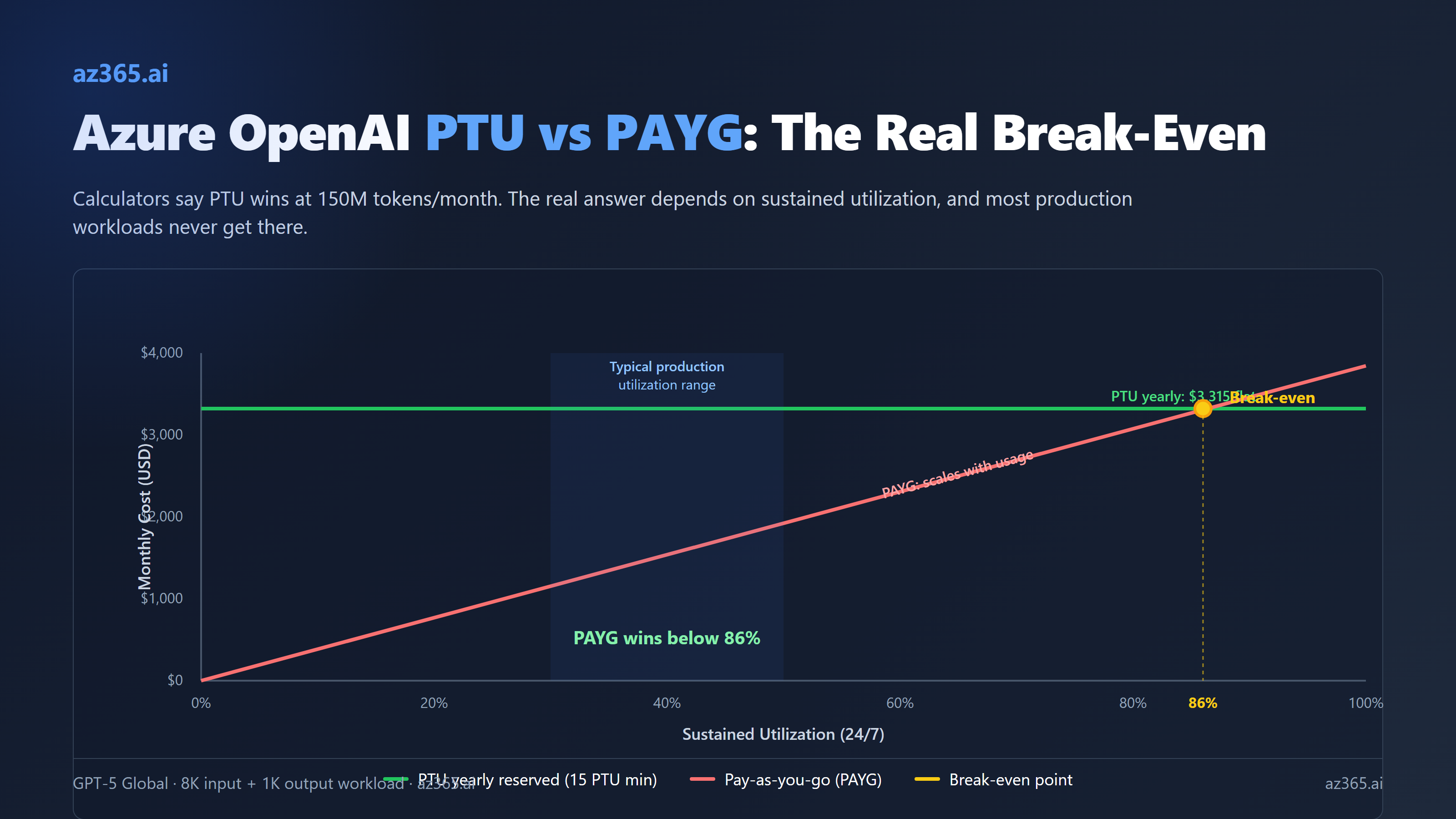
That math is wrong, or at least incomplete. Calculators assume 100% sustained utilization of the PTU deployment. Many production workloads run well below 100% sustained utilization; calibrate against your own telemetry. The gap between calculator math and reality is where, in the worked example below, a 15-PTU yearly reservation can cost more every month than the equivalent pay-as-you-go bill.
I pulled Microsoft’s own published per-PTU throughput numbers, current 2026 pricing, and ran the actual table for GPT-5 and friends. Here is what you should see before signing anything.
How PTU Billing Actually Works
A Provisioned Throughput Unit (PTU) is a unit of model processing capacity Microsoft sells you on a fixed hourly rate. You deploy a model in PTU mode, you reserve a number of PTUs, and you pay for those PTUs whether you use them or not. The model’s TPM (tokens per minute) capacity is a function of how many PTUs you bought.
Three flavors exist:
- Global Provisioned: cheapest, requests routed across global capacity
- Data Zone Provisioned: middle tier, requests stay within a continental data zone
- Regional Provisioned: most expensive, requests stay in a specific region
Global is what most architects pick. Data zone and regional cost more for compliance scenarios.
The minimum deployment is 15 PTUs for Global and Data Zone, scaling in increments of 5. Regional starts at 50 PTUs for most models. You cannot deploy “1 PTU of GPT-5 to test.” The smallest GPT-5 PTU deployment is 15 PTUs.
Three billing modes exist for the PTUs you reserve:
- Hourly: flexible, no commitment, expensive
- Monthly reserved: substantial discount, 1-month commitment
- Yearly reserved: biggest discount, 1-year commitment
Reservations are a financial construct, not a deployment construct. You buy reservations through the Azure portal Reservations page, and they automatically apply discount to any matching deployment in the same scope, region, and deployment type. Microsoft’s own guidance:
Reservations guarantee a discounted price for the selected term. They don’t reserve capacity on the service or guarantee that it will be available when a deployment is created. It’s highly recommended that customers create deployments prior to purchasing a reservation to protect against over-purchasing.
So the safe order is: deploy first (paying hourly), confirm capacity is available, then buy the reservation. You will pay hourly for at least a few days while you are sizing.
GPT-5 Pricing as of April 2026
Confirmed pricing for the GPT-5 family on Azure OpenAI / Foundry:
| Model | PAYG input ($/M) | PAYG output ($/M) | Cached input ($/M) | PTU hourly ($/PTU/hr)* | Min PTUs |
|---|---|---|---|---|---|
| gpt-5 (Global) | $1.25 | $10 | $0.13 | ~$1.00 | 15 |
| gpt-5-mini | $0.25 | $2 | (same 90% cache) | ~$1.00 | 15 |
| gpt-5-nano | $0.05 | $0.40 | (same 90% cache) | ~$1.00 | 15 |
| gpt-5-pro | $15 | $120 | (same 90% cache) | varies | 15 |
| gpt-5.4 | (varies) | (varies) | (varies) | varies | 15 |
*PTU hourly rates vary by model and region. The Azure Pricing Calculator is the authoritative source. The $1/PTU/hour figure for GPT-5 Global is based on 2026 Azure OpenAI pricing for GPT-5 Global PTU, with monthly reservations landing near $260/PTU/month and yearly reservations near $221/PTU/month.
A handful of additional billing levers apply:
- Cached input is roughly 10% of standard input rate (90% cache savings)
- Batch API offers 50% off async workloads
- Yearly reservation is roughly 70% off hourly PTU pricing
- Monthly reservation is roughly 64% off hourly PTU pricing
The hourly to yearly-reserved gap is huge. A 15-PTU GPT-5 deployment costs $10,800/month hourly, $3,900/month on a monthly reservation, and $3,315/month on a yearly reservation. Same capacity, 70% cost difference, just from the term commitment.
Throughput Per PTU: The Number That Drives Everything
Microsoft publishes the input-TPM-per-PTU for each model. This is the number that determines how much PAYG-equivalent traffic your PTU deployment can absorb.
| Model | Input TPM per PTU | Output:input ratio | Min PTUs (Global) |
|---|---|---|---|
| gpt-5 | 4,750 | 1 output = 8 input | 15 |
| gpt-5-mini | 23,750 | 1 output = 8 input | 15 |
| gpt-5.4 | 2,400 | 1 output = 8 input (assumed) | 15 |
| gpt-5.3-codex / 5.2 / 5.2-codex | 3,400 | 1 output = 8 input | 15 |
| gpt-5.1 / 5.1-codex | 4,750 | 1 output = 8 input | 15 |
| gpt-4.1 | 3,000 | 1 output = 4 input | 15 |
| gpt-4.1-mini | 14,900 | 1 output = 4 input | 15 |
| gpt-4.1-nano | 59,400 | 1 output = 4 input | 15 |
| gpt-4o | 2,500 | 1 output = 4 input | 15 |
| gpt-4o-mini | 37,000 | 1 output = 4 input | 15 |
| o3 | 3,000 | varies | 15 |
| o4-mini | 5,400 | varies | 15 |
| o1 | 230 | varies | 15 |
A few things jump out from this table:
- gpt-5-nano would be a TPM monster except OpenAI did not release nano on Azure at the time of writing. gpt-4.1-nano remains the cheapest high-throughput option on PTU.
- gpt-5.4 actually costs more in PTU terms than gpt-5, because its TPM per PTU is roughly half (2,400 vs 4,750). If your workload runs the same throughput on either model, you would need almost twice as many PTUs for gpt-5.4 to keep up.
- o1 is brutally low at 230 TPM per PTU. Reasoning models have high per-request token costs and PTU sizing for them gets expensive fast.
- Cached tokens are 100% deducted from utilization, meaning cache hits do not consume PTU capacity. That is a significant lever for prompt-caching-friendly workloads.
The output:input ratio matters because it determines how a typical mixed-shape request consumes utilization. For GPT-5, an output token “weighs” 8x an input token toward your TPM-per-PTU budget. So a request with 8K input and 1K output consumes 8,000 + (1,000 × 8) = 16,000 utilization tokens per minute against your 4,750-per-PTU budget.
The Real Break-Even Table for GPT-5
Run the math on a 15-PTU GPT-5 Global deployment, the smallest possible. Workload assumption: 8K input tokens, 1K output tokens per request.
Throughput ceiling: 15 PTUs × 4,750 input TPM = 71,250 effective input TPM. Each request consumes 16K weighted (8K input + 8 × 1K output). So the deployment caps at 71,250 / 16,000 = 4.45 requests per minute, or 6,400 requests per day, or roughly 192,000 requests per month at 100% utilization.
Token volume at 100% utilization: 192,000 requests × 8K input = 1.54B input tokens, plus 192,000 × 1K output = 192.5M output tokens.
PAYG cost at 100% utilization:
- Input: 1.54B × $1.25/M = $1,925
- Output: 192.5M × $10/M = $1,925
- Total PAYG at 100%: ~$3,850/month
PTU costs for the same 15 PTUs:
- Hourly: 15 × $1 × 720 = $10,800/month
- Monthly reserved: 15 × $260 = $3,900/month
- Yearly reserved: 15 × $221 = $3,315/month
Now run the table at different utilizations. Math derived from Microsoft published per-PTU TPM specs and 2026 Azure OpenAI list pricing. Calibrate against your own workload telemetry before committing.
| Utilization | PAYG cost ($/mo) | PTU hourly | PTU monthly reserved | PTU yearly reserved | Best choice |
|---|---|---|---|---|---|
| 100% (24/7 saturated) | $3,850 | $10,800 | $3,900 | $3,315 | Yearly reserved |
| 80% | $3,080 | $10,800 | $3,900 | $3,315 | PAYG |
| 60% | $2,310 | $10,800 | $3,900 | $3,315 | PAYG (large gap) |
| 40% (typical production) | $1,540 | $10,800 | $3,900 | $3,315 | PAYG |
| 20% (chatbot off-peak) | $770 | $10,800 | $3,900 | $3,315 | PAYG |
| 10% | $385 | $10,800 | $3,900 | $3,315 | PAYG (10x gap) |
The break-even utilization for yearly-reserved PTU vs PAYG is roughly 86% sustained. At 86% sustained 24/7 utilization, PAYG and yearly PTU cost the same. Below that, PAYG wins. Above that, PTU wins.
86% sustained utilization 24/7 is hard. It means you have ~6.4 GPT-5 requests per minute, every minute, every hour, every day, including 4am Sunday. Real production workloads almost never sustain that profile. They have peaks, valleys, seasonal patterns, weekends that drop to 10% of weekday traffic.
Hourly PTU never beats PAYG. Monthly reservation breaks even at roughly 100% utilization, which means it never beats PAYG in practice. The only PTU billing mode that actually wins on cost is the yearly reservation, and only when you can saturate the deployment.
The Three Scenarios Where PTU Actually Wins
PTU is a real bargain in three workloads. If yours fits one of these, sign the yearly reservation. If not, stay on PAYG.
1. High-volume customer-facing chatbot at scale. A consumer chatbot serving thousands of concurrent users from peak waking hours can hit 70-90% sustained utilization on a properly-sized PTU deployment. The traffic shape is predictable, the load is steady-state, and the latency floor of PTU (versus PAYG queueing) matters for user experience. Yearly reservation is the right call.
2. Heavy batch processing pipelines. A document processing pipeline that runs continuously through a queue of millions of documents can deliberately saturate a PTU deployment. You design the throughput to match the PTU ceiling. Each worker pulls from the queue at the rate the deployment can serve. Utilization stays at 95%+ by construction.
That said, the Batch API at 50% off PAYG often beats this anyway if the pipeline is not latency-sensitive. Always cost-compare batch + PAYG against PTU + saturate before signing.
3. Latency-critical real-time applications with predictable traffic. PTU gives you guaranteed latency. PAYG can hit queueing delays at peak. A trading-floor copilot, an emergency dispatch assistant, a real-time fraud-decision system has business reasons to pay for guaranteed latency that the cost calculator does not capture. PTU wins when the cost of a slow response is bigger than the cost of unused capacity.
The Hybrid Pattern: PTU + PAYG Spillover
The architecture pattern most production teams should look at:
- Deploy PTU sized for your baseline load (the floor of your traffic graph)
- Configure PAYG spillover for traffic that exceeds the PTU capacity
- Use Azure API Management or Azure Foundry routing to direct traffic to PTU first, then PAYG when PTU is saturated
This works because:
- Baseline traffic gets the PTU price (cheap when saturated, predictable latency)
- Spike traffic gets the PAYG price (no commitment, scales with load)
- You only commit to the PTU size you can fully utilize 24/7
- Cache lives on PTU side, free utilization, the most valuable cost lever you have
Sizing the PTU floor is the part most teams get wrong. Look at your historical per-minute traffic. Find the 30th percentile (yes, low). That is your PTU floor for cost-optimal hybrid. Going higher means you over-pay for unused PTU during quiet hours.
What Caching Actually Does to the Math
Cached input tokens are 100% deducted from PTU utilization and cost only ~10% of standard input rate on PAYG. This is the single biggest cost lever in the entire model.
If 70% of your input is cached (typical for chatbot with system prompt + RAG context):
- PAYG effective input cost: 0.30 × $1.25 + 0.70 × $0.13 = $0.466/M (62% lower than no cache)
- PTU throughput: 70% of input load is free, so the same PTU serves 3.3x more total requests
The PAYG-to-PTU break-even shifts dramatically when caching is in play. Workloads with heavy prefix caching can saturate a PTU deployment at much lower request volume, because each request consumes less utilization.
If you are running with 70% cache hits and 8K/1K request shape, the effective PAYG cost drops to ~$2,200/month at the same 192K request count. The PTU yearly reservation at $3,315/month never beats it unless utilization stays at 100%, which caching makes harder because each cached request takes longer to fill the PTU budget.
In other words: caching makes PAYG dramatically more competitive. Tune caching first, then revisit the PTU question.
Pre-Flight Checklist Before Buying a PTU Reservation
Run this before signing anything.
- Pull historical TPM data from Azure Monitor. Look at the last 30 days, p50 / p90 / p99 of input + output TPM, day-of-week and hour-of-day patterns.
- Calculate sustained utilization. Average TPM divided by deployment ceiling. If the answer is below 70%, you do not want PTU.
- Map workload type. Is it customer-facing latency-critical? Heavy batch? Variable RAG agent? PTU wins for the first two, loses for the third.
- Test the Batch API at 50% off for any async work. If batch covers your jobs, PTU is rarely the right answer.
- Estimate cache hit rate. If you can hit 50%+ prefix cache hits, run the math with cached pricing - PAYG looks much better.
- Check capacity availability. Quota does not equal capacity. Deploy first, confirm capacity, then reserve. Microsoft says it explicitly.
- Pick the right reservation term. Hourly is for benchmarks. Monthly reservation rarely beats PAYG. Yearly reservation is the real PTU value, but only for workloads you are confident will run for a year.
- Plan for spillover. Configure PAYG spillover before you go live, so spike traffic does not get queued or rejected.
How This Generalizes Beyond GPT-5
The same math applies to GPT-5-mini, gpt-4.1, gpt-4o, and the rest of the lineup. Different TPM-per-PTU and different PAYG rates give different break-even points, but the structural answer is the same:
- Hourly PTU never wins on cost (use it for benchmarks only)
- Monthly reservation rarely wins (60-65% break-even utilization, possible in narrow cases)
- Yearly reservation wins at high sustained utilization (depends on saturation; see the break-even math above)
For mini models like gpt-4o-mini at 37,000 TPM per PTU, the throughput per dollar is much higher, so PTU break-even shifts. But the same utilization caveat applies. You still need to actually use the capacity.
If you want to skip the spreadsheet, the rule of thumb that holds for GPT-5 family:
If your sustained utilization is below 70%, stay on PAYG with caching. If you can saturate above 85% on a yearly reservation, PTU wins; the magnitude depends on sustained utilization (see the break-even math above). Anywhere in between is a coin flip and depends on workload-specific factors.
What This Tells You About Azure AI Cost Architecture
Two takeaways for architects designing AI cost models in 2026.
First: cost calculators are sales tools. They optimize for “PTU sounds good” not “your actual workload.” Every published break-even comparison assumes 100% utilization because that is the chart that sells reservations. Build your own model with your own traffic data, or you are agreeing to the optimistic case.
Second: caching, batching, and routing matter more than provisioning mode. Most teams worry about PTU vs PAYG for weeks before they have implemented prefix caching. Implement caching first. Implement batch routing for async work. Then look at the residual cost shape and decide whether PTU adds value. In many cases, the answer becomes “no” once caching is in.
The senior architect’s role here is to push back on the procurement-first answer. Microsoft sells reservations because they are good for Microsoft’s revenue forecasting. Sometimes they are good for your cost picture. Often they are not. The data you need to know which is in your Azure Monitor logs, not in the calculator.
Related Reading
- Claude on Azure: The Marketplace Billing Trap - the third-party model trap that breaks startup credits
- AI Copilots vs Custom AI on Azure: Build vs Buy - when first-party Microsoft AI wins vs custom on Foundry
- Building AI Solutions on Azure: The Architecture That Actually Works - multi-component AI stack patterns
If you are sizing PTU vs PAYG for an enterprise workload and want a sanity check on the utilization curve, reach out.
Stay in the loop
Get new posts delivered to your inbox. No spam, unsubscribe anytime.
Related articles
AI Cost Governance in 2026: The Spend Caps That Don't Actually Cap
AI cost governance in 2026: the budget you reach for first only alerts, it never stops. A vendor-by-vendor playbook on which AI spend controls hard-stop and which just notify.
Azure AI Foundry vs Azure OpenAI: The 2026 Decision
Azure AI Foundry vs Azure OpenAI: the rebrand is consolidation, not deprecation. Decision tree, 8 scenarios, and the migration mechanics that bite.
Claude on Azure: The Marketplace Billing Trap
Why Microsoft for Startups credits do not cover Claude on Azure Foundry, where Claude Opus 4.7 actually deploys, and the pre-flight checks architects must run before shipping.