Architecture Diagrams with Draw.io MCP Server and Claude Code
Generate swimlanes, ERDs, and integration maps from text using Claude Code and the Draw.io MCP server. Free, git-friendly, no Visio needed.

“Can you draw me an architecture diagram?”
That used to mean: open Visio (if you have a license), spend 30 minutes fighting with connectors, export a PNG, paste it into a Word doc that nobody will update. Or worse: open PowerPoint and draw boxes with arrows.

Now I describe what I want in plain text and Claude generates a Draw.io architecture diagram in seconds. No Visio license. No manual dragging. Version-controlled XML that diffs in git as part of your living documentation.
How Do You Generate Architecture Diagrams with Claude and Draw.io?
You describe the system in plain English and Claude produces valid Draw.io XML through the MCP server. The diagram opens in your browser for review, and you save the .drawio file directly into your repo’s /docs folder. The entire process takes under a minute for most diagrams, compared to 30+ minutes of manual work in Visio or Lucidchart.
The Setup
The Draw.io MCP server runs locally and renders diagrams from mxGraphModel XML. Claude Code connects to it through the MCP protocol and can create diagrams from text descriptions.
- 1
Install the Draw.io MCP server
Add it to your .mcp.json config. It runs locally on port 3000 and opens a browser-based editor.
- 2
Describe what you want
Tell Claude: 'Create a swimlane diagram showing the performance review process with 4 lanes: Employee, Manager, HR, System.' Claude generates the XML.
- 3
Review and refine
The diagram opens in your browser at localhost:3000. Adjust positioning if needed, or ask Claude to modify specific elements.
- 4
Save the XML
Copy the .drawio file to your /docs folder. Commit to git. It's now versioned with your code.
What It Generates
Here’s a swimlane process diagram generated the same way:
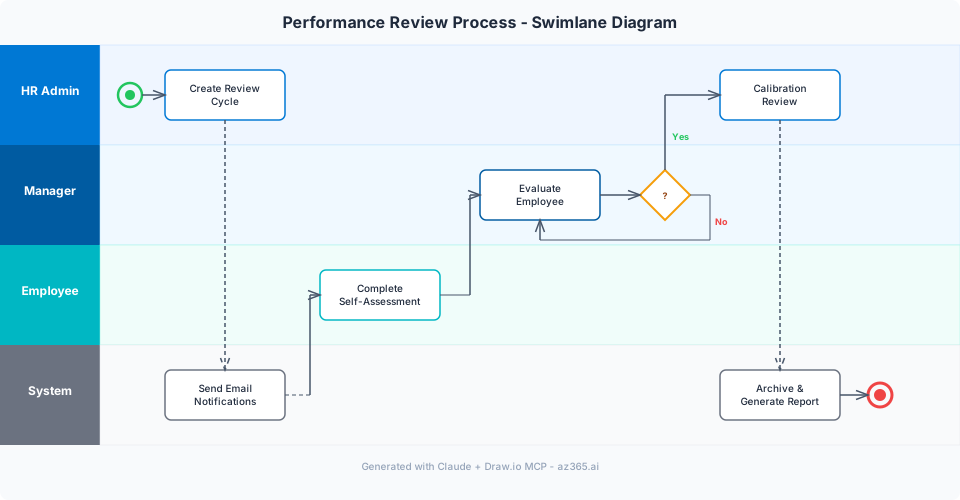
Claude handles these diagram types well:
| Diagram Type | Quality | Best For |
|---|---|---|
| Swimlane / process flow | Excellent | Business processes, approval workflows, user journeys |
| Entity Relationship Diagram | Good | Dataverse schema visualization, data models |
| Integration map | Good | System context diagrams, API connections |
| State machine | Excellent | Record status flows, lifecycle diagrams |
| Data flow | Good | Source-to-target mapping, ETL pipelines |
| Sequence diagram | OK | API call sequences (Mermaid is better for these) |
Real Example: D365 Integration Architecture
I described this to Claude:
“Create a Draw.io architecture diagram showing: Dynamics 365 CE in the center, connected to Azure AI Search (for document indexing), an external ERP via Azure Service Bus, Power Automate for email notifications, and Dataverse audit log feeding into Power BI. Use blue for Azure services, green for D365, gray for external systems.”
30 seconds later:
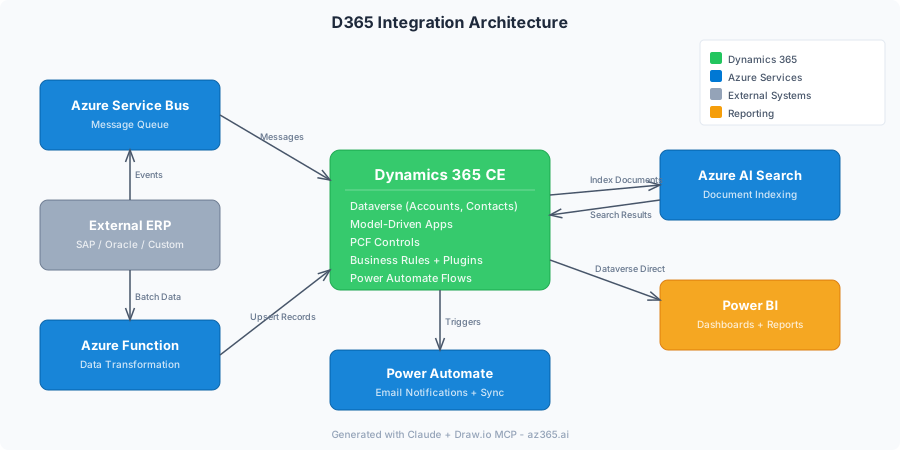
Would it have taken me 30 minutes in Visio? More.
What It Gets Right
- Structure and layout. Claude understands that swimlanes have horizontal lanes, ERDs have relationships, integration maps have system boundaries.
- Color coding. Tell it your color scheme and it applies consistently.
- Labeling. Connection labels, system names, data flow descriptions.
- XML validity. The generated mxGraphModel XML renders correctly in Draw.io every time.
What It Gets Wrong
- Complex layouts. Diagrams with 20+ elements sometimes overlap. You need to drag things around manually.
- Pixel-perfect positioning. It approximates positioning. Fine for working diagrams, not for presentation slides.
- Your specific codebase. Claude doesn’t know your actual table names or API endpoints unless you tell it. Paste your schema or API spec for accurate diagrams.
- Aesthetic polish. The diagrams are functional, not beautiful. If you need presentation-quality, use Draw.io’s manual tools for final polish.
The Prompt Pattern That Works
Be specific. Don’t say “draw an architecture diagram.” Say:
Create a Draw.io diagram showing:
- [System A] connects to [System B] via [protocol/method]
- [System C] reads from [System B] on a [schedule]
- Use [color] for [category], [color] for [category]
- Include a legend in the top-right corner
- Layout: left-to-right flow
The more context you give, the better the output. Paste your actual table names, API endpoints, or flow definitions for maximum accuracy. For Dataverse projects, you can export your schema with XrmToolBox and feed it directly to Claude for an accurate ERD.
Building a documentation practice for your Power Platform team? Follow Alex on LinkedIn for more patterns on AI-assisted architecture and living docs.
Compared to Other Tools
| Tool | Cost | AI Generation | Git Friendly | Collaboration |
|---|---|---|---|---|
| Draw.io + Claude | Free | Yes (text to diagram) | Yes (XML diffs) | Via git |
| Visio | $15/mo | No | No (binary format) | SharePoint co-edit |
| Lucidchart | $8/mo | Limited AI | No | Real-time co-edit |
| Miro | $8/mo | No | No | Real-time co-edit |
| Mermaid | Free | Yes (Claude writes Mermaid) | Yes (text format) | Via git |
Draw.io + Claude wins on cost (free), AI generation (full diagrams from text), and git friendliness (XML diffs). It loses on real-time collaboration - you collaborate through pull requests, not simultaneous editing.
What’s Next
Next article: using this workflow to generate ERDs from XrmToolBox schema exports. Export your Dataverse schema, feed it to Claude, get a visual ERD in 5 minutes.
AZ365.ai - Azure and AI insights for architects building on Microsoft. Follow Alex on LinkedIn for architecture deep dives.
Stay in the loop
Get new posts delivered to your inbox. No spam, unsubscribe anytime.
Related articles
Logic Apps as MCP Servers - The Architecture That Actually Works
Turn Azure Logic Apps into MCP servers for AI agents. Two approaches, auth gotchas, cost math, and the architecture diagram Microsoft didn't draw.
Generating 20+ Architecture Diagrams in Minutes: A Batch-Generation Pattern
Generate ERDs, network topologies, security models, CI/CD pipelines, and integration maps from code. The batch-generation pattern that replaces weeks of Visio work.
Dataverse MCP, Business Skills, and Coding Agents: The 2026 Decode
Dataverse MCP server, Business Skills, Coding Agents plugin shipped May 5, 2026. Adopt-now-or-defer decision frame, five pilot gotchas, procurement surface.