Dataverse MCP, Business Skills, and Coding Agents: The 2026 Decode
Dataverse MCP server, Business Skills, Coding Agents plugin shipped May 5, 2026. Adopt-now-or-defer decision frame, five pilot gotchas, procurement surface.

Microsoft just shipped a 6x faster Dataverse search index and made it MCP-addressable from Claude Code, GitHub Copilot, and Copilot Studio on the same endpoint. In our read, that re-opens every agent-on-Dataverse decision your architecture team rejected on cold-start time, staleness, or single-vendor lock-in.
Direction, not yet maturity. Microsoft’s architectural direction is now clear. Operational maturity is uneven across real-world agent implementations. Community signal already shows Copilot Studio agents misreading large Dataverse tables (Reddit r/copilotstudio thread on 300-400k row FP&A misreads, May 2026), multi-turn grounding drifting, and conversational context retention failing inconsistently. Read this article as platform direction. Calibrate production timing against your own pilot.
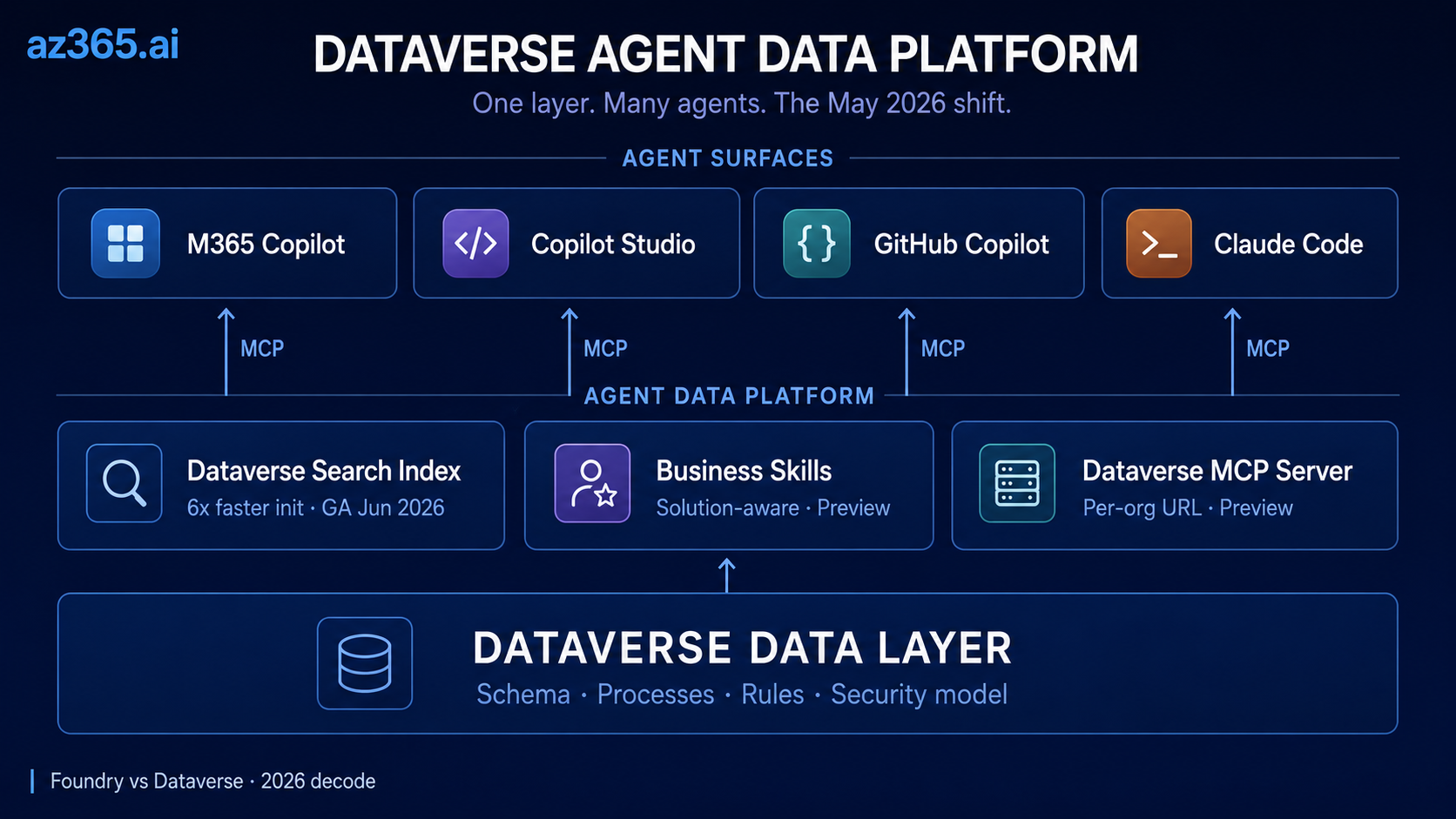
The May 5, 2026 Power Platform announcement is, in our read, more consequential than the Foundry rebrand: Dataverse was repositioned from “the database under Power Apps” to the agent data platform under everything, the schema and process and rule layer that AI agents reason against, exposed through MCP servers that work with any MCP-compatible client.
This article is the decode.
Three Layers, Named Explicitly
Before the substance, name the layers. The May 5 announcement spans three distinct abstraction levels. Conflating them is how most decode articles get muddled.
| Layer | Responsibility | Microsoft surfaces (May 2026) |
|---|---|---|
| Reasoning / model layer | Generate, reason, plan from context | Azure AI Foundry, GPT-5 family, Claude, Llama, DeepSeek |
| Agent / orchestration layer | Plan, route, invoke tools, manage conversation state | Copilot Studio, Foundry Agent Service, Claude Code, GitHub Copilot |
| Business / data context layer | Provide schema, processes, rules, security model for grounding | Dataverse + Business Skills + Dataverse MCP Server |
This article is about the bottom row. The model and orchestration layers move independently; Dataverse-as-agent-data-platform is the layer that handles table relationships, column-level metadata, security-trimmed retrieval, process instructions, and schema-aware tool invocation for the agents on top. The rest of the article assumes this separation.
An operational note up front. Adopting this platform does not eliminate the architect’s existing responsibilities. Proper semantic modeling (which tables, which relationships, which lookups), data shaping (clean records, deduplicated entities, sensible types), retrieval design (schema-aware queries, security trimming, knowledge sources scoped to use case), and deterministic tooling for calculations (Power Automate flows, calculated columns, external compute) all still apply. The platform makes agentic AI possible on Microsoft business apps; the architect’s discipline makes it correct.
What Shipped on May 5, 2026
The May 5 announcement is consolidation, not invention. The Dataverse MCP server has been in preview since late 2025; the agentic search index work has been rolling since December 2025; the original M365 Copilot sidecar shipped earlier in 2026 inside Power Apps and Dynamics 365 Sales / Customer Service. What changed last week is the framing (Dataverse-as-platform, not Dataverse-as-database), the GA expansion of Copilot to the full M365 surface (early June 2026), and the addition of Business Skills + the Coding Agents plugin as first-class concepts. One section is GA, two are public preview, all three sit on top of the MCP server preview.
The sections below decode each.
What Is the Dataverse MCP Server? (The Multi-AI Access Layer)
Direct answer. The Dataverse MCP server is a per-organization Model Context Protocol endpoint at https://{dataverseOrgName}.crm.dynamics.com/api/mcp that exposes Dataverse data, schema, and tools to any MCP-compatible agent client. As of 2026-05-10 it is in public preview, gated by Dataverse intelligence and per-client allowlisting in environment settings.
It exposes Dataverse data, schema, and tools to any MCP-compatible client: Copilot Studio agents, VS Code GitHub Copilot in agent mode, Claude Code, Claude Desktop, GitHub Copilot CLI. Per-client allowlisting happens in environment settings.
That, read in plain terms, is the multi-AI manifesto in Microsoft’s own product. A query authored once is consumable by every agent platform a serious enterprise has on its roadmap.
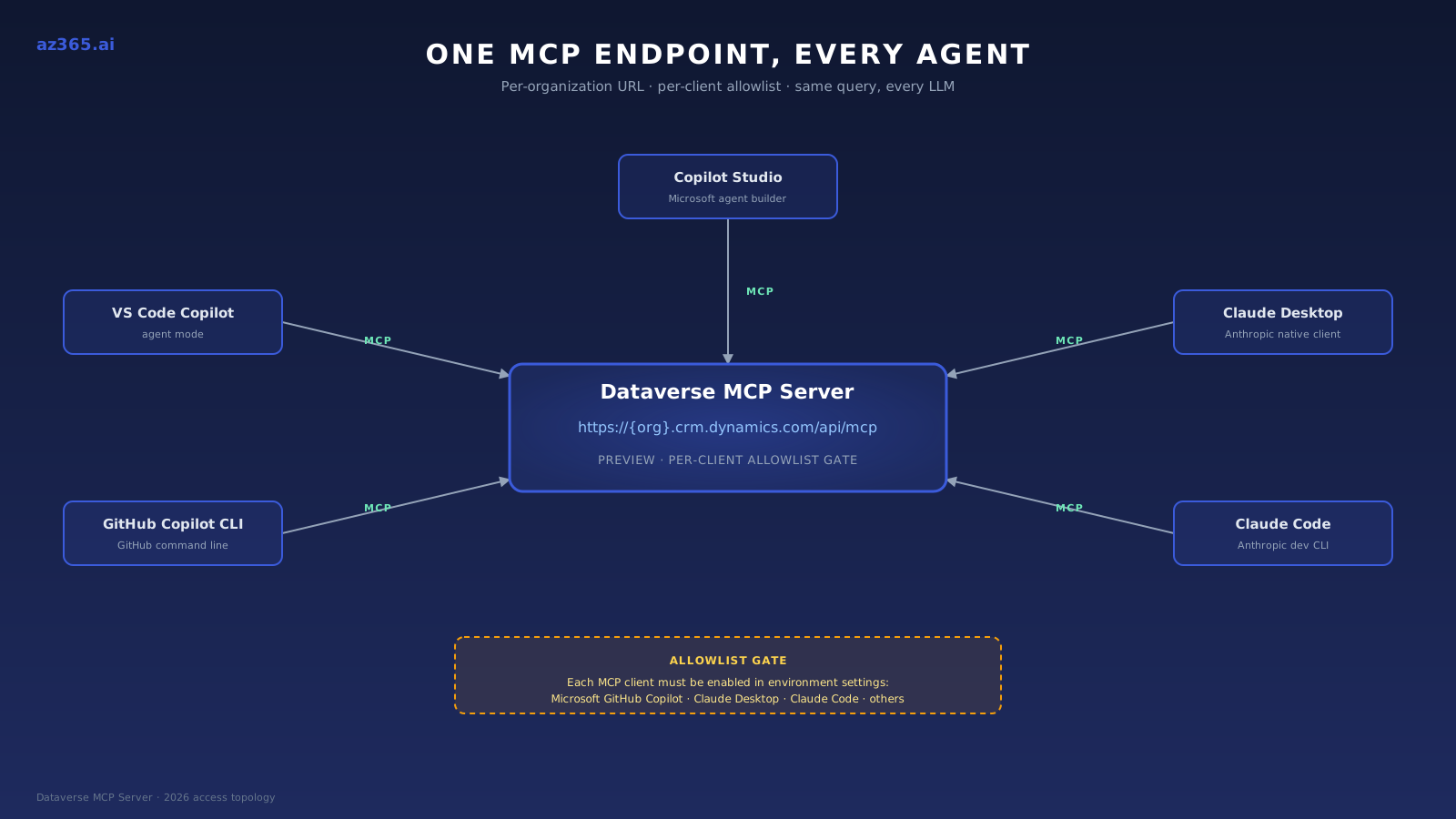
The Dataverse MCP Server as a per-organization endpoint with per-client allowlisting. Same query, every LLM.
Concrete setup example for Claude Code:
# Replace contoso with your Dataverse org name; verify allowlist in env settings first
claude mcp add dataverse https://contoso.crm.dynamics.com/api/mcp

# Verify the server registered
claude mcp list
For VS Code GitHub Copilot in agent mode, the equivalent is MCP: Add Server from the Command Palette with the same URL pattern. See the VS Code Copilot configuration docs for the full flow.
Dataverse in Microsoft 365 Copilot: 6x Faster Search Index (GA, June 2026)
The original sidecar shipped inside Power Apps and D365 Sales / Customer Service earlier in 2026. The May 2026 announcement expands the experience to the full M365 surface: desktop Copilot App, Teams, Outlook, Word, Excel, and PowerPoint, with availability “early June 2026.” The expansion is GA, not preview.
The substance under the marketing is the search index upgrade. Dataverse search has three index types: relevance search (powers global search and the SearchQuery API), structured (powers Copilot and agents over tables), and unstructured (powers Copilot and agents over files). The May 2026 update is principally about the structured and unstructured indexes that power generative AI experiences.
The headline numbers, per Microsoft’s May 5 announcement:
- Up to 6x faster initialization for new environments (minutes instead of hours)
- Near-real-time data freshness (updates appearing within minutes)
- Zero-disruption schema evolution via background refreshes
- Independent admin control for the Copilot indexing path versus the global search path
The “6x” is a Microsoft-reported figure; treat it as a vendor benchmark pending independent verification. The implication for architects, in our read, is real regardless of the exact multiplier: if pre-May-2026 you rejected an agent-on-Dataverse design on cold-start time or staleness, the calculus has changed enough to re-open the decision.
Business Skills: Solution-Aware Process Knowledge for Agents (Preview)
Business Skills is, in our view, the most architecturally significant of the three capabilities.
Until now, agents grounded in Dataverse data had two options. Rely on the LLM to figure out the business process from the schema and instructions. Or hardcode process logic into agent prompts and Power Automate flows. In our experience both approaches scale badly: prompts drift, flows fragment across environments, and process knowledge ends up scattered across multiple owners and surfaces.
Business Skills consolidates this into a first-class artifact. A skill is a markdown document with a name, description, step-by-step instructions, and optional resource files (policies, SOPs, templates, calculations). Per the MS Learn page, the size limits are 20 MB per resource file and 30 MB per uploaded skill. Crucially, skills are solution-aware: they package into Dataverse solutions, deploy through ALM pipelines, and move between environments alongside tables and flows.
Microsoft’s announcement highlights Velrada’s Inspection Agent as a customer example. Per Microsoft’s published summary, the agent uses Business Skills to handle HVAC equipment assessments, asking context-appropriate questions based on equipment class and inspection history. Treat this as a Microsoft-surfaced example, not an independently-verified production case study.
Prerequisites you will hit:
- Managed Environment (not standard environments)
- Dataverse intelligence enabled (tenant-level toggle)
- Dataverse MCP server preview enabled (environment-level toggle)
- Solution-aware ALM if you want to move skills between dev, test, and prod cleanly
If your environment governance team is still pushing back on Managed Environments adoption, this is, in our read, the forcing function for that conversation.
What a minimal Business Skill looks like in markdown (illustrative; structure mirrors Microsoft’s published format):
---
name: log_call_transcript
description: Logs a customer call transcript into Dataverse as an activity. Use whenever a user pastes call notes and asks the agent to record them.
---

# Steps

1. Identify the related Account by company name in the transcript.
2. Create an Activity record with type = "Call", subject = first line of transcript.
3. Populate Description with the full transcript text.
4. Link the Activity to the Account via regardingobjectid.
5. Return the new Activity record ID to the user.

# Resources

- account-lookup-rules.md: how to disambiguate companies with similar names.
- transcript-redaction-policy.pdf: PII handling rules before storing.
The skill becomes discoverable by any MCP client connected to the Dataverse MCP server. An agent in Copilot Studio, Claude Code, or GitHub Copilot can find and execute it without per-client configuration.
Dataverse Plugin for Coding Agents: Claude Code + GitHub Copilot (Preview)
The third announcement is the one that earns the multi-AI manifesto label most clearly. The Dataverse Plugin for Coding Agents is open-source, published on Claude Marketplace, and explicitly supports both Claude Code and GitHub Copilot.
Per Microsoft’s May 5 announcement, the plugin is an orchestrator across four existing tools:
| Tool | Purpose | Status |
|---|---|---|
| Dataverse MCP Server | Ad-hoc queries, schema discovery, CRUD operations | Preview |
| Dataverse CLI | Solution-aware operations, low-code-aware patterns | Preview |
| Python SDK | Batch operations, complex data transformations | GA |
| PAC CLI | Solution export, environment management, admin tasks | GA |
The plugin’s value, per the announcement, is the orchestration logic: when a developer asks “set up a leads table with fields A, B, C, lookup to accounts, and a sample dataset,” the plugin decides whether to call the MCP server for schema, the CLI for solution-aware deployment, or the Python SDK for bulk insert.
This is structurally similar to the Power Pages plugin Microsoft shipped earlier in 2026, which uses the same Claude Code + GitHub Copilot CLI pattern with conversational slash commands. The Dataverse Plugin generalizes that pattern from Power Pages specifically to any Power Platform / D365 environment.
Why open-source matters in our read. Microsoft is not gating this behind Power Platform Premium. The plugin is on Claude Marketplace, so a developer with an Anthropic Pro subscription and a Power Platform environment can install and use it without an additional Microsoft license tier. That is unusual for Microsoft AI tooling, and the architect’s read is that Microsoft is treating the developer plugin layer as a distribution play, not a revenue play.
A worked example, condensed. The developer prompt:
> /create-table leads with columns name (text), email (text),
> account_lookup (lookup to accounts), source (choice)
> + 100 sample rows
The plugin’s orchestration logic, per Microsoft’s announcement:
- Calls the MCP server for
accountstable schema discovery (small payload) - Calls the Dataverse CLI to create the
leadssolution-aware table with columns + lookup relationship - Calls PAC CLI to confirm the deployment into the active solution
- Calls the Python SDK for the 100-row bulk insert (lower per-row cost than MCP individual creates)
- Returns the deployment manifest + sample record IDs to the developer
The decision logic that picks the right tool per sub-task is the value-add over running any one of these directly.
Worked Example: Invoice Exception Handling at a 200-Supplier AP Team
Abstract architecture only becomes believable when tied to a specific ugly workflow. The one we run through here is invoice exception handling in mid-market accounts payable. The agent layer does not solve this end-to-end. It does the work that humans currently do badly while leaving the work the platform should not own to deterministic tooling.
The setup. A 200-supplier mid-market AP team in Dynamics 365 Finance. Three Dataverse tables matter: Supplier, Invoice, PurchaseOrder. Invoices arrive via email and shared inbox; 8-12% hit an exception state (PO mismatch, missing GL code, unit-price drift outside tolerance, line-item arithmetic doesn’t match header total, duplicate against an already-paid invoice). An AP clerk currently triages each exception manually. Typical clearance time: 45-90 seconds per invoice if obvious, 5-15 minutes if not.
What the agent does. A Copilot Studio agent connected to the Dataverse MCP server, with a Business Skill named triage_invoice_exception. The skill’s instructions, in plain markdown:
---
name: triage_invoice_exception
description: Classifies an invoice exception into one of five categories and proposes the next action. Use when an invoice is in state "Exception" and needs a routing decision.
---

# Steps

1. Read the Invoice record (status = "Exception").
2. Read the related PurchaseOrder via the regardingobjectid lookup.
3. Read the related Supplier record for payment terms and prior-period dispute history.
4. Compare invoice header total against the sum of line-item totals using a deterministic calculation tool, NOT the LLM's arithmetic.
5. Classify the exception into one of: PO_MISMATCH, MISSING_GL, UNIT_PRICE_DRIFT, ARITHMETIC_MISMATCH, DUPLICATE.
6. For DUPLICATE: query Invoice table for matching supplier + amount + invoice-date within 30 days; return finding with the duplicate's record ID.
7. For UNIT_PRICE_DRIFT: query the last 5 invoices from this supplier for the same SKU; return the price-trend with timestamps.
8. Return a structured recommendation: route_to (AP_clerk_review | supplier_followup | controller_approval | auto_reject), confidence_score, and one-line rationale.

# Constraints

- Never approve, reject, or pay an invoice. The agent classifies and routes. Humans approve.
- For ARITHMETIC_MISMATCH, always defer to the deterministic calculation; do not "estimate" the math.
- If supplier has 3+ disputes in the last 12 months, escalate to controller_approval regardless of other signals.
What breaks in production. Three named failure modes the architect must design around:
- Schema drift on the Invoice table. If someone adds a new line-item column without updating the skill instructions, the agent reasons over stale schema until the next MCP server schema refresh propagates. Mitigation: lock the relevant columns via a manifest and add a CI check that the skill’s referenced columns still exist.
- Hallucinated duplicate detection. The LLM, given a 100-row invoice query result for the same supplier, will occasionally invent a duplicate that does not exist. Mitigation: force the duplicate-check to use a deterministic Dataverse query with explicit equality filters, not LLM pattern-matching on the result set.
- Context-window overrun on suppliers with 200+ invoices. The “last 5 invoices for the same SKU” step looks cheap; on a long-tail supplier it pulls a wider result set and pushes the conversation over the context budget. Mitigation: paginate via
read_querywith an explicittop=5 order=invoice_date descclause; never let the agent fetch unbounded.
What the architecture buys. Done right, the agent triages 70-80% of exceptions in under 15 seconds with the deterministic tools handling the calculations and the LLM handling classification + routing. The AP clerk sees only the 20-30% that need actual judgment. That is the realistic operational outcome. It is not the marketing slogan (“AI does AP for you”). It is the actual outcome architects can defend to a CFO.
Dataverse Agent Data Platform: Naming and Glossary
Two name shifts to know before the table. The brand has drifted from “Azure AI Foundry” toward “Microsoft Foundry” in product surfaces, and Dataverse references now sit under both Power Platform and Microsoft 365 documentation depending on which agent surface is the subject. The Azure resource type stays Microsoft.CognitiveServices/accounts, and Dataverse stays Dataverse. Of the eight terms below, the two load-bearing ones for an architect are Business Skills and Dataverse MCP Server. The rest are useful aliases.
| Term | What it is | First surfaced |
|---|---|---|
| Agent Data Platform | The positioning of Dataverse as the schema, process, and rules layer for agents | 2026-05-05 |
| Dataverse MCP Server | The MCP-compatible access layer for Dataverse data and tools, exposed at https://{org}.crm.dynamics.com/api/mcp | 2025 (preview) |
| Business Skills | Solution-aware natural-language process documentation that agents discover via the Dataverse MCP server | 2026-05-05 (preview) |
| Dataverse Plugin for Coding Agents | Open-source plugin on Claude Marketplace that orchestrates MCP, CLI, Python SDK, and PAC CLI for Claude Code plus GitHub Copilot | 2026-05-05 (preview) |
| Agentic AI Powered Dataverse Search | The semantic indexing layer feeding Copilot and agents | Late 2025 |
| Dataverse Intelligence | Tenant-level umbrella feature gate that controls AI capabilities including Business Skills and the MCP server | Existing |
| Power Apps MCP Server | Separate, complementary MCP server for app-level operations (data entry, agent feed). Distinct from the Dataverse MCP server | Preview |
| Dynamics 365 Customer Service MCP Server | Domain-specific MCP server (case enrichment, next-action, draft-email) which, in our read, layers on top of the Dataverse MCP server | Preview |
If your team is still writing “Azure AI Foundry” in tickets, rename now. The next 90 days of Microsoft documentation will increasingly use “Microsoft Foundry” and “Dataverse Agent Data Platform” terminology exclusively.
Should You Adopt Dataverse Business Skills and MCP Server Today?
Direct answer: Build now if your agents already ground in Dataverse, you can adopt Managed Environments, and your developers use Claude Code or GitHub Copilot today. Otherwise adopt the GA M365 Copilot expansion in June and defer Business Skills and the Dataverse Plugin until they exit public preview.
Five conditions determine the answer:
- Are your agents grounded in Dataverse data already?
- Can you adopt Managed Environments?
- Do you tolerate preview-grade dependencies on the MCP server and Business Skills?
- Do you have ALM discipline to move skills between environments cleanly?
- Is your developer team using Claude Code or GitHub Copilot today?
Six scenarios map those conditions to an action.
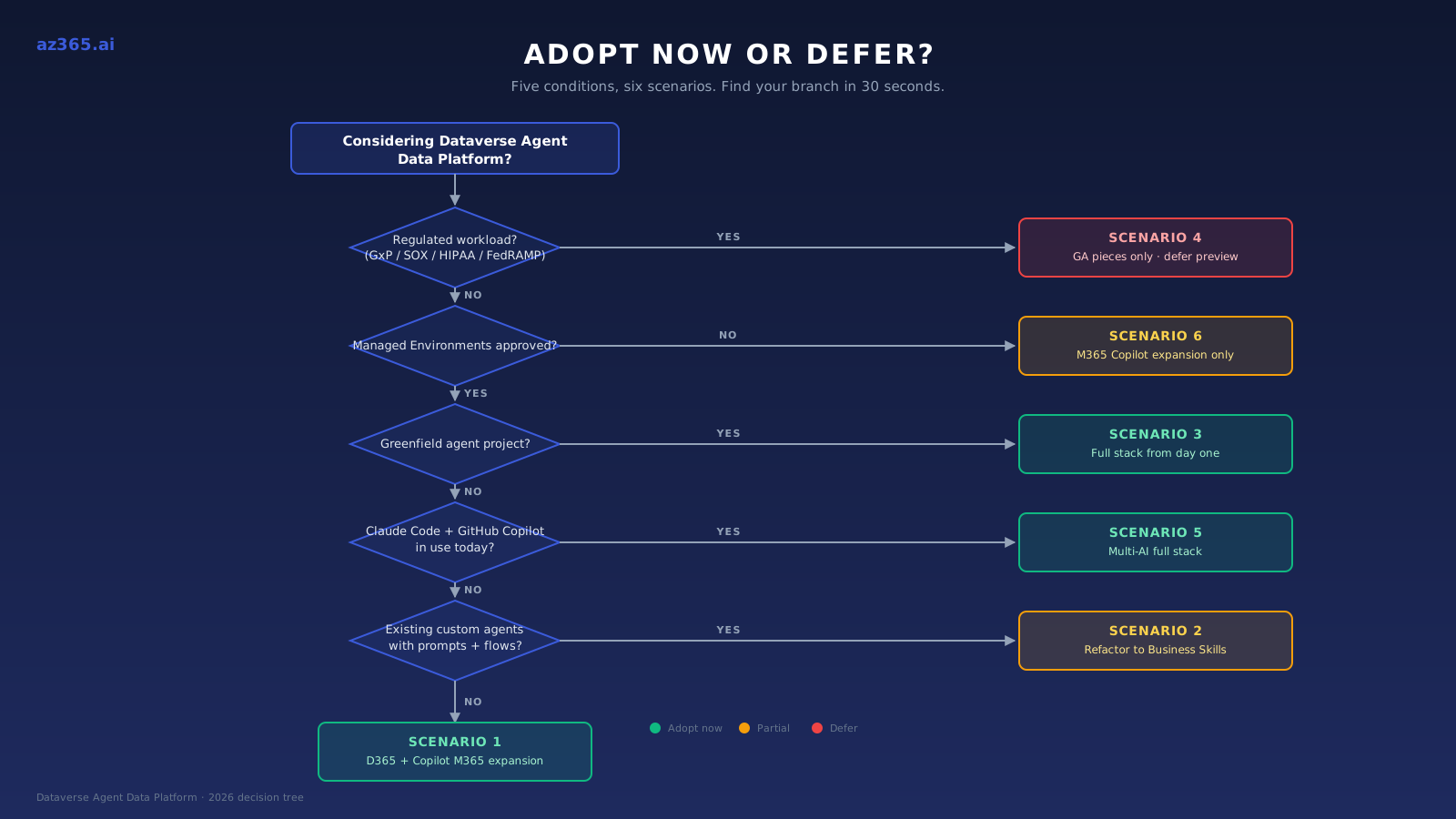
Self-classify in 30 seconds. The table below is the same decision in reference form.
| Scenario | Profile | Adopt now | Defer | Blocker |
|---|---|---|---|---|
| 1. D365 + Copilot deployed | Existing D365 customer with M365 Copilot in use | M365 Copilot expansion (June, GA) | Business Skills until Managed Environments approved | None for the GA pieces |
| 2. Power Platform with custom agents | Active agent builds, prompt + flow process logic | Refactor process logic into Business Skills (preview) | Wait for GA only if prompts/flows are working | Managed Environments must be on |
| 3. Net-new agentic AI on Microsoft | Greenfield agent project | Full stack: MCP server, Business Skills, Dataverse Plugin in Claude Code or GitHub Copilot | Nothing | Preview-coverage tolerance |
| 4. Regulated workload (FS, healthcare, gov) | GxP, SOX, HIPAA, FedRAMP scopes | GA pieces only (M365 Copilot expansion, search index) | Preview features until GA + your compliance review | Preview status = no SLA = no production |
| 5. Multi-AI-by-design team | Claude Code + GitHub Copilot in use today | Full stack; architect across both LLM tools using the same Business Skills | Nothing | Managed Environments + Anthropic / GitHub procurement |
| 6. Standard-environment-only constraint | Governance hasn't approved Managed Environments | M365 Copilot expansion only | Business Skills + MCP server (entirely) | Managed Environments adoption (renegotiate now) |
Rule of thumb: if you pass three or more of the five conditions, build now. Otherwise adopt the GA expansion and wait for the rest to exit preview.
Five Pilot Gotchas in the Dataverse Agent Data Platform
For teams who decide to adopt now, here are the things that bite during pilot.
1. Tenant-level prerequisite stack: Managed Environments AND Dataverse intelligence. Two separate tenant-level toggles, both required for Business Skills and the MCP server. Managed Environments is org-wide governance; Dataverse intelligence is the AI-feature gate that controls the MCP server and Business Skills. If either is missing, the rest of the stack fails opaquely. In our experience, plan a 4-6 week governance approval cycle for Managed Environments adoption if your tenant has been deferring it.
2. Storage cost increases with enhanced semantic indexing. Per Microsoft’s May 5 announcement, the structured and unstructured indexes that power Copilot and agents use more storage than relevance search alone. Microsoft has not published a specific pricing-delta percentage as of 2026-05-10; in our experience the delta scales with index breadth (how many tables and file types are included) more than with row count. The new admin controls let you opt into Copilot indexing per-environment, so budget for a non-trivial increase before flipping the switch on production and tune the included-table list to your actual agent surface area.
3. The MCP server URL is per-organization, not per-environment. Format: https://{dataverseOrgName}.crm.dynamics.com/api/mcp, per the Dataverse MCP server configuration docs. Plan your client configuration around that, especially in multi-org tenants. Connection also requires the appropriate MCP client to be allowlisted in environment settings: Microsoft GitHub Copilot, Claude Desktop, Claude Code, and others are individually configurable.
4. Business Skills are solution-aware but the MCP server preview features are not. When you package skills into a solution and move them to production, the skill content moves but the MCP server preview tools that the skills depend on are environment-level toggles. Verify your destination environment has the right preview features enabled before the solution import, or skill execution will silently fail in prod.
The failure mode, in our experience: the skill imports cleanly into the destination solution, agents successfully list the skill via list_skills, but when the agent attempts to invoke skill steps that depend on preview MCP tools (for example retrieve_knowledge or solution-aware skill resources), the call returns an empty payload rather than an error. The agent then fabricates an answer from instructions alone, with no log trace of the missing tool. Pre-import verification checklist: Managed Environments enabled, Dataverse intelligence on, MCP server preview enabled, and per-client allowlist re-applied to the destination environment. Confirm all four before any solution import containing skills.
5. MCP schema-discovery context cost on large-schema orgs. Calls to the Dataverse MCP server for schema discovery consume LLM context window in proportion to table and column count. In our experience on a 50-plus-table org with default custom-column density, broad schema discovery has spent roughly 8K-15K tokens before any productive work; a 200-table CRM org pushes that into 30K-50K range. Plan for context budgets the same way you plan for storage budgets, and use targeted describe_table calls instead of list_tables followed by global discovery when the agent already knows which entities are in scope.
The synthesis: every gotcha resolves to one of two root causes. Tenant-level toggle discipline (gotcha 1) gets you past the most common blocker. Preview-aware ALM + budget hygiene (gotchas 2, 3, 4, 5) covers the rest. Get those two right and the rest is configuration.
Procurement and Compliance Surface
This section is for the procurement lead, compliance officer, and platform governance owner reading along. The architect-side decoding above does not answer your questions, and they are real.
| Concern | Question to ask | Defensible position |
|---|---|---|
| Data residency for MCP traffic | When Claude Code or GitHub Copilot calls {org}.crm.dynamics.com/api/mcp, where does the prompt route to (Microsoft, Anthropic, OpenAI)? Which region? | As of 2026-05-10, Microsoft has not published a Dataverse MCP traffic-flow diagram. Direction-of-travel in our read: the MCP server itself is hosted in your Dataverse tenant region (Microsoft-side leg); the LLM call routes to Anthropic / OpenAI / Microsoft Foundry per the agent client’s configured endpoint and that vendor’s data-processing terms. Verify both legs explicitly. Document the routing in your processor inventory and reference the Anthropic Data Processing Addendum at https://www.anthropic.com/legal/dpa for the Claude leg. |
| Audit logging coverage | Do Dataverse audit logs cover MCP-mediated agent actions with the same fidelity as record-level reads and writes? | As of 2026-05-10, Microsoft has not fully documented end-to-end audit coverage for MCP-mediated actions. Treat audit coverage as “verify in your environment” rather than “assumed complete.” Layer Purview if attribution gaps emerge. |
| Preview contractual treatment | Are the Dataverse MCP server and Business Skills covered under standard MSA SLAs? | Both are currently public preview, which sits outside standard Microsoft Online Services Terms SLAs. For regulated production scopes (GxP, SOX, HIPAA, FedRAMP), preview features are a contractual blocker. Defer until GA, or restrict to non-regulated tenants for pilot. |
| Claude Marketplace shadow-IT vector | Can developers install the Dataverse Plugin via personal Anthropic credentials, outside Microsoft procurement? | Yes, the plugin is open-source on Claude Marketplace and installable with a personal Anthropic Pro subscription. Defensible policy: require an organization-issued Anthropic account and an approved Managed Environment before plugin use is permitted. |
The pattern: every concern in the table maps to “verify before you allow.” Preview status is the most common gating concern; data residency and shadow-IT are the two most often missed.
What This Does NOT Mean
Six bounds, surfaced explicitly because the “agent data platform under everything” framing is broader than the actual scope. Skeptical architects will (and should) ask each of these:
- Dataverse does not replace data lakes. Azure Data Lake and OneLake remain the right home for high-volume analytics data, telemetry, raw event streams, and ML training datasets. Dataverse is the operational business-context layer; it is not, and is not trying to be, your analytics substrate.
- Dataverse does not replace Microsoft Fabric, a data warehouse, or the lakehouse pattern. Fabric is the analytics, reporting, and large-scale data engineering platform. Synapse / dedicated SQL pools / Azure SQL Data Warehouse remain the answer for structured analytics at warehouse scale. Dataverse-as-agent-data-platform is downstream of all three for agent grounding on operational data, not a substitute for any of them.
- Dataverse does not replace vector stores. Azure AI Search and other vector databases remain the right answer for embedding-based retrieval over unstructured content. The Dataverse search index includes a structured-and-unstructured layer for Copilot grounding on Dataverse-resident data; that is not a general-purpose vector store substitute.
- Dataverse-as-agent-data-platform does not eliminate hallucinations. Grounding agents in business context narrows the gap between LLM output and operational reality; it does not close it. Retrieval quality still depends on schema quality, multi-turn grounding still drifts, and large-table reasoning still produces wrong sums.
- Not all enterprise data should move into Dataverse. Dataverse is the right home for operational business records, processes, and rules. Moving analytics, telemetry, file storage, or non-business data into Dataverse for AI grounding is an anti-pattern; use the right substrate per data type and let the agent reach across via Foundry Tools or connectors.
- Agents are not suddenly reliable autonomous workers. A Dataverse-grounded agent is more accurate than a prompt-only agent. It is not a finished product. Production agent reliability still depends on human-in-the-loop patterns, evaluation gates, fallback flows, and the operational discipline you would apply to any system that makes decisions at scale.
- Dataverse-as-agent-data-platform is not sufficient without governance. Adopting the MCP server, Business Skills, and the Coding Agents plugin does not absolve the platform team of DLP policy, Purview labels, audit-log review cadence, RBAC tightening, or environment-strategy hygiene. Governance is what makes the agent layer safe; the platform makes it possible.
- Dataverse-as-agent-data-platform is not sufficient without deterministic tooling for calculations. Agents grounded in Dataverse still produce probabilistic outputs. For anything that needs a correct number on the first try (claim totals, invoice math, regulatory thresholds, financial reconciliation), wire deterministic logic via Power Automate flows, Dataverse calculated columns, or external compute. Use the agent layer to orchestrate; use the deterministic layer to compute.
How the 2026 Dataverse Shift Reshapes Microsoft AI Architecture
In our read, the Power Platform / Dataverse moat just got deeper.
Every enterprise with a meaningful D365 or Power Platform footprint has a head start on agentic AI that pure Azure OpenAI shops do not. The depth of the head start tracks the depth of your existing Dataverse footprint:
- The schema is already there
- The business processes are already there
- The security model is already there
The May 2026 announcement is, in our view, Microsoft cashing in that head start by exposing all three to agents through MCP.
Our bet, falsifiable: by the November 2026 Power Platform Release Wave, at least two of the three preview features in this article will be GA, AND at least one Azure-only AI competitor will ship a “why you don’t need Dataverse” counter-narrative. If both happen, build deeper. If neither happens, the moat is shallower than this announcement suggests.
The architect’s question is whether you build with the consolidation or watch it. Our read is build. Your mileage depends on which system of record you actually have.
Sources and Verification Posture
Citation discipline for this article, surfaced explicitly so readers can audit the claims:
| Claim type | Source posture | Reader verification path |
|---|---|---|
| Microsoft-reported numbers (6x faster init, 20 MB / 30 MB skill limits, May 1 cutover, early June 2026 GA) | Vendor-attributed. Treat as Microsoft’s published figures pending independent benchmark. | Linked to Microsoft’s May 5 announcement and MS Learn product docs. No third-party benchmark available within 5 days of the announcement. |
| Microsoft-surfaced customer example (Velrada Inspection Agent) | Microsoft-published, not independently verified by az365.ai. | Treat as vendor case-study summary, not a production case study reviewed at the customer level. |
| MS Learn documentation references (Dataverse MCP server, Business Skills, Power Apps MCP Server, Dataverse auditing, etc.) | First-party Microsoft documentation. URLs verified live via MS Learn search at 2026-05-10. | Click any inline link to read the source. |
| Architectural framings (“control-plane move”, “moat got deeper”, “head start”) | Authorial opinion, framed “in our read” or “in our view” throughout. | Hedges are explicit; treat these as the architect’s reading, not Microsoft’s positioning. |
| Experiential estimates (4-6 week governance cycle, 50-plus-table context cost) | Author’s pilot experience, framed “in our experience”. | Calibrate against your own tenant scale; the numbers are illustrative not benchmarked. |
| Forward-looking claims (“consolidation continues through 2026”) | Projection, framed “our bet is”. | Time-bound; reassess when next Microsoft Power Platform Release Wave lands. |
Any reader-visible factual claim outside this matrix should be flagged in the comments; we will update this article accordingly.
Related Reading
- Azure AI Foundry vs Azure OpenAI: The 2026 Decision - the Azure-side platform decision that hosts Foundry-side agentic workloads
- Logic Apps as MCP Servers: Architecture That Actually Works - the integration layer that pairs naturally with the Dataverse MCP server
- Claude on Azure: The Marketplace Billing Trap - the procurement layer for Claude-on-Azure deployments, including the Marketplace path the Dataverse Plugin uses
- Can You Trust AI With Security Code? Microsoft Learn MCP Didn’t Save Four Wrong Dataverse Designs - real-world cautionary tale on MCP-driven design when the agent gets the schema right but the security wrong
Dataverse + Agentic AI cluster (publishing through May / June 2026): Claude Code + GitHub Copilot on Dataverse · Dataverse Business Skills: When to Use Skills vs Flows vs Plugins · Building Agentic AI Apps Over Dataverse: 2026 Reference Architecture · RAG Over Dataverse: What the Agentic Search Update Changed · Dataverse vs Microsoft Graph: When Agents Should Use Which
If you are working through how Dataverse Agent Data Platform fits into an enterprise Microsoft AI architecture and want a sanity check on the scenario mapping, reach out.
Stay in the loop
Get new posts delivered to your inbox. No spam, unsubscribe anytime.
Related articles
Dataverse MCP Server: Tool Shape Is Your New Security Perimeter
Microsoft's Dataverse MCP Server turns your system of record into agent-callable tools. The contract you define, not the platform, decides what an LLM can do.
Azure AI Foundry New vs Classic: 2026 Migration Map
Azure AI Foundry new vs classic, decoded: the feature-parity matrix, what transfers in a hub migration, the two hard 2026 dates, and when to stay on classic.
From Assist to Execute: The Reference Architecture Implications Microsoft's Playbook Doesn't Draw (2026)
The Assist-to-Execute shift in Microsoft's Agentic Patterns Playbook is the right conceptual move. This is the reference architecture implications the playbook stops short of drawing.