Azure AI Landing Zone: The 2026 Reference Architecture for IT Directors
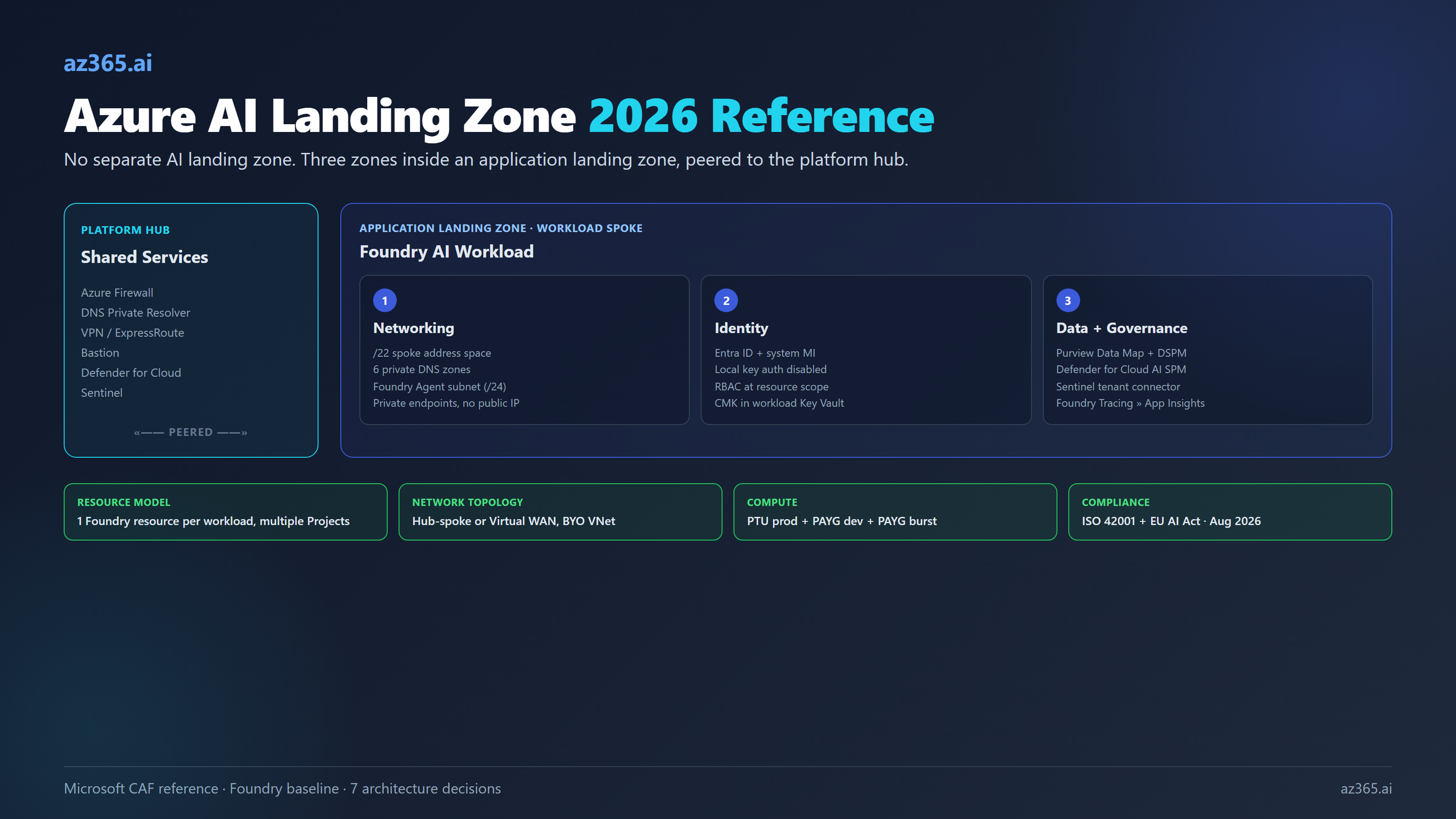
Microsoft says you do not need a separate AI landing zone. You need an application landing zone with networking, identity, and data wired right. Here is the 2026 reference architecture.

The first question every IT director asks when AI lands on the roadmap is the wrong one. They ask “where does the AI landing zone go in our management group hierarchy.” Microsoft’s answer, written into the Cloud Adoption Framework and reaffirmed in the 2026 baseline reference architecture, is blunt: it does not. AI is just another workload. You deploy it into an existing application landing zone alongside everything else.
The right question is what changes inside that application landing zone when the workload happens to be a Foundry deployment with a few hundred million tokens a month flowing through it. Three things change. The networking is more opinionated, because Foundry’s managed components have hard requirements about DNS resolution and private DNS zones that fail loudly during deployment. The identity model is tighter, because Foundry’s three-FQDN structure and the role-assignment grants you make at upgrade time decide who can touch which models for the next eighteen months. The data and governance plane is wider, because Microsoft Purview, Defender for Cloud’s AI Security Posture Management, and Sentinel all want hooks into the workload before it goes to production.
This article is the reference architecture for an IT director who has been told “we need an Azure AI landing zone” and is responsible for not screwing it up. It covers the management group placement Microsoft actually recommends, the seven decisions you will make in the first deployment, and the configurations that make Foundry agents fail to deploy. It treats the Azure stack as authoritative for Microsoft-shop architecture, but it is honest about where the same patterns apply to AWS Bedrock and Google Vertex AI, because Defender for Cloud’s AI SPM treats those as peers.
What Microsoft Actually Recommends (and What It Does Not)
Microsoft’s Cloud Adoption Framework is unambiguous on AI placement: “You don’t need a separate AI landing zone. Instead, you use the existing Azure landing zone architecture to deploy AI workloads into application landing zones.”
Translated: every Azure tenant has exactly two zone types. A platform landing zone (one per tenant) holding the shared services: identity, connectivity, management, security, governance. Application landing zones (one per workload, scoped per environment) holding the workloads themselves. AI is a workload. AI goes in an application landing zone.
The reference management group hierarchy stays the same as for any Azure deployment:
Tenant Root
  └─ Intermediate Root (often "Contoso")
       ├─ Platform
       │    ├─ Connectivity
       │    ├─ Identity
       │    ├─ Management
       │    └─ Security
       ├─ Landing Zones
       │    ├─ Corp (internally-facing workloads)
       │    └─ Online (internet-facing workloads)
       ├─ Sandboxes
       └─ Decommissioned
A Foundry-based AI chat application typically lives under Landing Zones → Corp (if it is internal) or Landing Zones → Online (if it serves customers). Three subscriptions per workload: dev, test, prod. Microsoft says management groups should stay flat (three to four levels max) and should never be created per region or per environment.
What does change for an AI workload is the inside of the application landing zone. That is where the rest of this article focuses.
The Three Reference Architectures (and How They Stack)
Microsoft publishes three Foundry reference architectures, layered in increasing maturity:
| Architecture | Use case | Key constraints |
|---|---|---|
| Basic Foundry chat | POC, demos, hackathons | All-public endpoints, no private link, single subscription |
| Baseline Foundry chat | Standalone production workload | Private endpoints, single VNet, single region, no platform team |
| Baseline Foundry chat in an Azure landing zone | Enterprise production workload | Hub-spoke or Virtual WAN, platform team owns hub, six private DNS zones, Azure Policy enforced |
The progression matters. You do not jump from basic to baseline-in-ALZ. You build basic to verify the application logic works, then baseline to verify the security model works, then baseline-in-ALZ to verify the networking and governance integration with the platform team works. Each layer adds about two weeks of integration work for a team that has not done it before.
The Azure AI Landing Zones community accelerator (preview) ships Bicep and Terraform templates for the baseline-in-ALZ tier in two flavors: AI Landing Zone for Foundry (direct Foundry deployment) and AI Landing Zone for APIM (Foundry fronted by Azure API Management for token gateway, rate limiting, and multi-tenant routing). This is a community project that drops on top of an existing platform landing zone. It is not the same as the Microsoft-supported CAF accelerators, which are the platform landing zone foundation.
The Naming Reset You Need to Internalize
Half of the confusion in 2026 deployments comes from architects mixing pre-rebrand and post-rebrand terminology. Microsoft consolidated the brand in late 2025. Internalize this:
| Pre-rebrand | Current (2026) | What it actually is |
|---|---|---|
| Azure OpenAI Service | Azure OpenAI in Foundry Models | Model family inside Foundry |
| Azure AI Studio / Azure AI Foundry | Microsoft Foundry | The unified portal + service brand |
| Azure AI Services | Foundry Tools | Speech, Vision, Language, Translator, Content Safety |
| AI Hub + AI Project | Foundry resource + Foundry project | Top-level container + sub-container |
| AI Hub connections | Foundry connections | Auth-bearing pointers to Storage, Search, Cosmos |
| Assistants API | Responses API + Conversations | Agent SDK surface (deprecation Aug 2026) |
kind: OpenAI resource | kind: AIServices with allowProjectManagement: true | The ARM-level upgrade marker |
The Foundry resource is a single ARM resource (Microsoft.CognitiveServices/accounts with kind: AIServices) that hosts Projects as child resources. A Project is the unit of team isolation, RBAC scope, and connection ownership. One Foundry resource per workload, with multiple Projects underneath, is the supported topology for an application landing zone. The older “Foundry-at-business-group with delegated projects” model has cost-allocation limitations and Microsoft no longer recommends it.
The Three Zones Inside the Application Landing Zone
Every Foundry workload subscription needs three things wired before production. Networking, identity, data plus governance. The decisions inside each zone interlock.
Networking: The Load-Bearing Decision
The Foundry baseline-in-ALZ networking design splits the workload across two virtual networks.
The workload spoke holds all the customer-managed components behind private endpoints: Application Gateway (the public ingress), App Service (the chat app), Foundry resource, Azure AI Search, Cosmos DB (for thread storage), Storage account, Key Vault. Recommended spoke address space is a contiguous /22. Smaller blocks fail because Foundry Agent Service requires its own subnet inside a /24 prefix and only supports RFC1918 ranges. A /26 spoke with the AppGw and PE subnets already cut will not have room.
The platform hub holds the shared services: Azure Firewall (or third-party NVA), Bastion for ops jump-box access, VPN/ExpressRoute gateway, and DNS Private Resolver. The platform team owns this. The workload team owns the spoke and peers it to the hub.
Six private DNS zones must exist and be linked to the workload spoke before deployment (this is the most common Foundry deployment-failure cause):
privatelink.services.ai.azure.com(Foundry data plane, partner models like Anthropic Claude)privatelink.openai.azure.com(Azure OpenAI compatibility endpoint)privatelink.cognitiveservices.azure.com(legacy Cognitive Services / Foundry Tools)privatelink.search.windows.net(Azure AI Search)privatelink.blob.core.windows.net(Storage)privatelink.documents.azure.com(Cosmos DB)
Plus the usual privatelink.vaultcore.azure.net (Key Vault) and privatelink.azurewebsites.net (App Service). Foundry Agent Service does not honor the spoke’s DNS configuration; it pre-checks resolution against DNS Private Resolver rulesets, and if the agent capability host cannot resolve the Foundry data plane FQDN, the deployment fails before agents can be created.
The Foundry “managed virtual network” feature (preview as of late 2025) is an alternative pattern where Microsoft manages the VNet that fronts agent compute. It has three modes: Allow internet outbound, Allow only approved outbound (Firewall + service tags + FQDN rules), and Disabled (BYO VNet via injection). Once you pick Allow internet, you cannot downgrade to Allow approved (or vice versa) without redeploying. Managed private endpoints in this mode do not create customer-visible NICs, which is a NIC-visibility regression versus classic private endpoints. For most regulated workloads, BYO VNet with vNet injection is the right default until managed VNet exits preview.
The hub-spoke versus Virtual WAN choice is orthogonal to the AI workload. Hub-spoke gives full control over Firewall/NVA selection. Virtual WAN gives any-to-any transitivity, scales globally, and is generally the right choice if the deployment touches more than two regions or expects branch/SD-WAN integration. Microsoft documents both as valid in CAF.
Identity: Three Decisions That Live for Years
The Foundry baseline assumes Microsoft Entra ID for users and system-assigned managed identity on every component: App Service to Foundry, Foundry to AI Search/Storage/Cosmos. RBAC at resource scope, not management group scope. There are three identity decisions worth making explicit.
Disable local API key authentication. Azure Policy “Azure AI Services resources should have key access disabled” enforces this. Key auth still works in dev and the Foundry portal, which is fine, but it should be denied in prod. Once disabled, every request must come from a managed identity or an Entra-issued token. This is a one-line policy assignment that prevents 80% of the credential-leak scenarios that show up in incident reports.
Use system-assigned managed identity, not user-assigned. Customer-managed keys (CMK) for Foundry require system-assigned MI; user-assigned is not supported. If you are planning CMK for compliance reasons later, choose system-assigned now and avoid the conversion.
Watch the role assignments at upgrade time. When you upgrade an existing Azure OpenAI resource to a Foundry resource, the broad “Cognitive Services User” role grants access to all Foundry features, including non-OpenAI models like Llama, Grok, DeepSeek, and Anthropic Claude. The narrower “Cognitive Services OpenAI User” role keeps the scope to OpenAI features. If your governance posture is “OpenAI only, until we approve other models,” tighten role assignments before you flip the resource kind.
Data and Governance: The Wider Plane
Three Microsoft tools own this layer.
Microsoft Purview does double duty. The Data Map indexes AI inputs and outputs as metadata. DSPM for AI discovers sensitive data flows into AI systems. Purview Audit captures every Copilot, Foundry, and custom-app prompt and response for compliance review. The native Foundry-Purview integration enables at the subscription level and requires no developer code, but it has one constraint: Purview policies (DLP, sensitivity-label enforcement) need user-context Entra tokens. Service-principal-only flows do not get Purview policy enforcement. Plan for end-user identity propagation if compliance is in scope.
Microsoft Defender for Cloud’s AI Security Posture Management (under Defender CSPM) discovers AI workloads across Azure OpenAI, Azure AI Foundry, Azure ML, Amazon Bedrock, and Google Vertex AI. Multi-cloud is officially in scope. Defender’s threat protection for Foundry Tools detects jailbreak and prompt-injection attacks at the model layer; alerts flow into Defender XDR and correlate with Purview audit. AI agent discovery (Foundry agents plus Copilot Studio agents) is in preview and included with Defender CSPM at no extra cost during preview.
Microsoft Sentinel ingests Defender alerts via the tenant-based Microsoft Defender for Cloud connector (preview), giving full-tenant AI alert coverage without per-subscription enablement. Bi-directional incident sync is supported. If your SOC already runs Sentinel, the AI hooks are configuration, not new tooling.
For the customer-managed key story specifically: CMK requires Foundry resource and Key Vault in the same region and Entra tenant (different subscription is fine). Soft Delete and Purge Protection must be on. RSA or RSA-HSM 2048 keys only. One workload, one Foundry resource, one Key Vault is the cleanest topology.
Seven Decisions You Will Make
These are the architecture decisions that shape an AI landing zone for the next eighteen months. Document each as an ADR. The recommended defaults below are the ones Microsoft’s reference architecture and field experience converge on.
| Decision | Options | Recommended default |
|---|---|---|
| Public-IP vs private endpoint ingress | Public + IP allowlist · Private endpoint + jump box · Private endpoint + transitive routing from VPN/ExpressRoute | Private endpoint + transitive routing (no jump box) |
| Subscription topology | Per-environment (dev/test/prod) shared across workloads · Per-AI-workload (3 subs per workload) | Per-AI-workload (avoids cost-allocation limits) |
| PTU vs Standard (PAYG) | PTU only · PAYG only · PTU prod + PAYG dev/test + PAYG burst overflow | PTU prod (regional or global, with reservation) + PAYG dev + PAYG burst |
| Hub-and-spoke vs Virtual WAN | Customer-managed Firewall in classic hub · Virtual WAN secured hub | Virtual WAN if >2 regions or SD-WAN; classic hub-spoke for single-region with strict NVA control |
| Key Vault topology | Per-workload KV · Shared platform KV · Mixed | Per-workload KV for production AI workloads (CMK locality) |
| Foundry managed VNet (preview) vs BYO VNet | Managed VNet · BYO VNet with vNet injection | BYO VNet until managed VNet GA |
| Purview integration mode | Native subscription-level integration · API-based selective · Off | Native on prod subscriptions, off on sandbox |
The Mistakes Microsoft Teams Actually Ship With
Five recurring deployment failures, ranked by how often they show up in incident reports.
1. Hub region chosen wrong relative to model availability. The workload region must match the hub region for private DNS and Firewall to work. Foundry models have limited regional availability for PTU: East US, East US 2, North Central US, and Sweden Central are typical. If the platform team picked West Europe as the hub for latency reasons and your PTU models are only in Sweden Central, you have a peering problem you did not budget for. Pick the workload region first based on model availability; pick or align the hub second.
2. Public network access left enabled. Foundry deploys with public network access enabled by default. The two valid production states are Disabled (private endpoint required) or Selected networks (explicit IP allowlist). Leaving it on Enabled is the most common audit finding.
3. Missing private DNS zones for services.ai.azure.com and cognitiveservices.azure.com. This breaks Foundry-only features (agents, Foundry Tools, partner models) silently from the workload spoke. The Azure OpenAI compatibility endpoint (*.openai.azure.com) often works because it was set up for the legacy AOAI deployment, masking the gap.
4. Azure Policy conflicts that block Foundry deployment. Three policies fight Foundry baseline: “Secrets in KV should have max validity period” (Foundry tool secrets have no expiry), “AI Search should use CMK” (the baseline architecture does not assume CMK on Search), and “Foundry models should not be preview” (developers want preview models for evaluation). Negotiate exceptions with the platform team or extend the baseline before deployment, not during.
5. Co-deploying Copilot and Foundry without recognizing the two trust boundaries. Microsoft 365 Copilot lives in the M365 tenant identity boundary. Foundry lives in the Azure subscription identity boundary. They share Entra but have separate audit trails, separate Purview policies, separate licensing, and separate compliance scope. Treating them as one stack creates audit gaps that show up in the first ISO 42001 readiness assessment.
The Vendor-Neutral Caveat
Azure landing zones are the right pattern for Microsoft-shop enterprises. They are not the only pattern. AWS has the equivalent: Control Tower plus the Landing Zone Accelerator plus Bedrock guardrails. AWS Bedrock is already discoverable from Defender for Cloud’s AI SPM. Google has Cloud Foundation plus Vertex AI; also discoverable in Defender CSPM.
The CSA AI Controls Matrix and NIST AI RMF are vendor-neutral control frameworks. ISO/IEC 42001 is vendor-neutral and is what Microsoft, AWS, and Google are all certifying against. If your enterprise has a multi-cloud strategy, the AI landing zone pattern works in all three clouds, with different acronyms and different services. Microsoft’s own posture is multi-cloud; Defender CSPM treating Bedrock and Vertex as peers is the proof.
The decision to consolidate AI workloads on Azure is a procurement decision, an identity decision, and a compliance decision. It is not an architecture decision. The architecture pattern is the same.
What This Tells You
Three takeaways for the IT director planning the next twelve months.
First: do not build a separate AI landing zone. Microsoft’s own guidance is to deploy AI workloads into existing application landing zones. The pattern that fails most often is the team that decided AI was special and built a parallel hierarchy. Six months in, the platform team has two sets of policies to maintain, the SOC has two sets of detections, and nothing in the AI hierarchy has the budget approvals or RBAC reviews of the rest of the estate.
Second: networking is the load-bearing decision. Foundry’s six private DNS zones, the /22 spoke address requirement, the Agent Service subnet inside a /24, the choice between BYO VNet and the preview managed VNet: these are the configurations that decide whether your first agent deploys cleanly or fails three times. Get the platform team’s network ops involved before the first POC, not after.
Third: identity decisions made at upgrade time live for years. When you upgrade an existing Azure OpenAI resource to Foundry, the role assignments, the disable-local-auth toggle, and the system-assigned versus user-assigned managed identity choice are the ones you will not want to change later. Make them deliberately at upgrade, not implicitly.
The Foundry rebrand is not a marketing exercise. It is a consolidation of three resource types into one, a new portal, a new SDK surface, and a stable v1 API path. The landing zone pattern absorbs all of it because the pattern was not about Foundry in the first place. It was about disciplined separation between platform and workload, identity and access, data and governance. AI is one more workload. That is the whole point.
Related Reading
- AI Governance Framework for Microsoft Enterprises - the operational governance layer that runs on top of the landing zone
- Azure OpenAI PTU vs PAYG: The Real Break-Even Table - the cost layer for the deployment-type decision in this article
- Building AI Solutions on Azure: Architecture Patterns - the workload-level patterns that sit inside this landing zone
- Logic Apps as MCP Servers: Production Architecture - one of the integration patterns referenced in the workload spoke
If you are designing the AI landing zone for a Microsoft-heavy enterprise and want a sanity check on the seven decisions, reach out.
Stay in the loop
Get new posts delivered to your inbox. No spam, unsubscribe anytime.
Related articles
Azure AI Foundry New vs Classic: 2026 Migration Map
Azure AI Foundry new vs classic, decoded: the feature-parity matrix, what transfers in a hub migration, the two hard 2026 dates, and when to stay on classic.
Azure AI Foundry vs Azure OpenAI: The 2026 Decision
Azure AI Foundry vs Azure OpenAI: the rebrand is consolidation, not deprecation. Decision tree, 8 scenarios, and the migration mechanics that bite.
Foundry Hosted vs In-Process vs Copilot Studio Agents (2026 Decision)
Foundry Hosted vs in-process vs Copilot Studio agents: a 2026 four-gate decision framework that picks the right path by who builds it and who runs it.