Shadow AI Governance for Microsoft Enterprises: Discovery to Control
98% of enterprises have shadow AI. Only 30% have visibility. The 30-day discovery sprint using Defender for Cloud Apps, Purview, Entra, and Power Platform CoE Toolkit, with the 3-tier graduation framework.

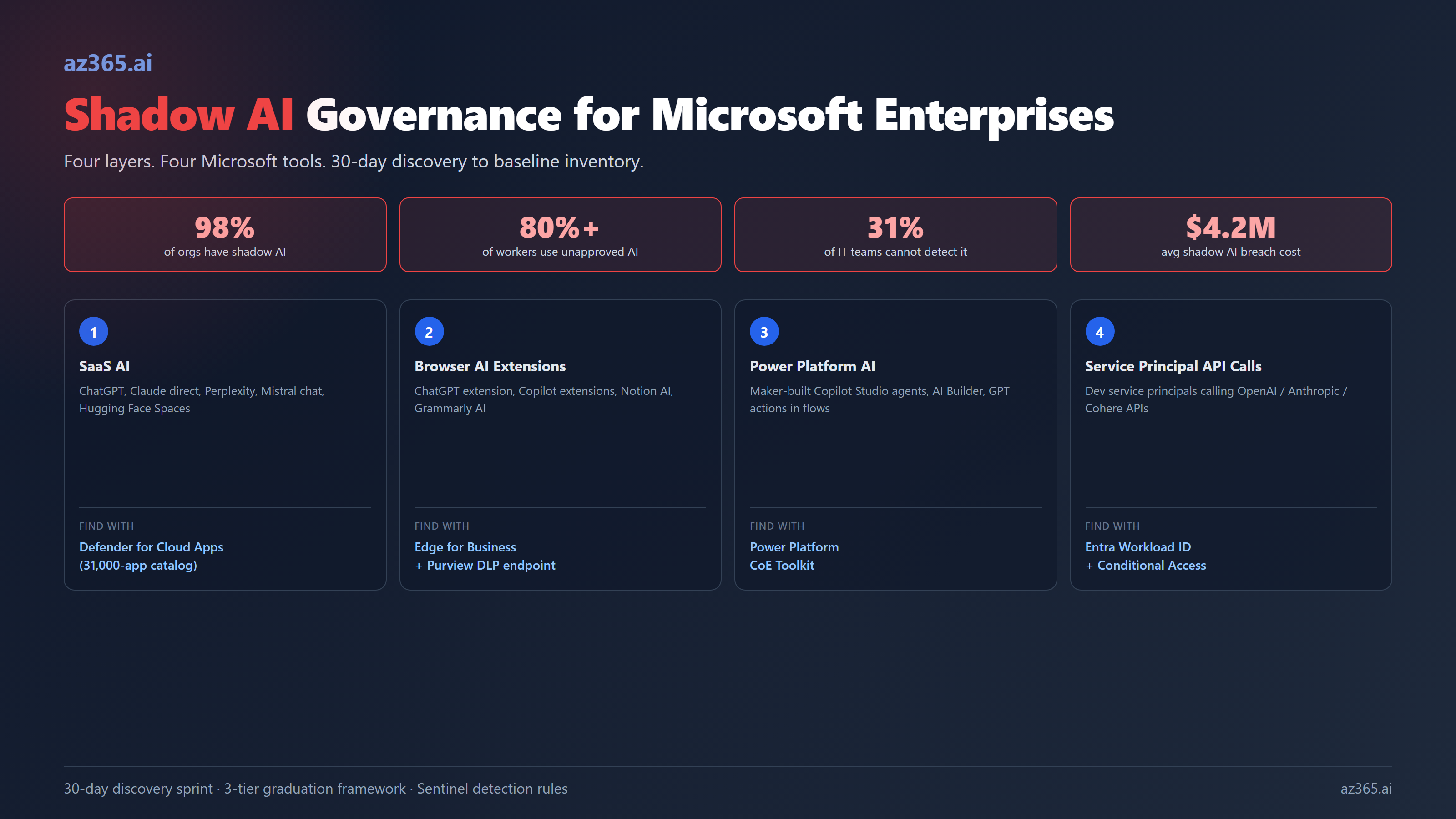
Almost every enterprise has shadow AI. The numbers are not subtle: 98% of organizations have employees using unsanctioned AI tools. More than 80% of workers admit to using unapproved AI at work. About 45% do not tell their employer. The kicker: 31% of IT teams cannot detect unauthorized AI in real time, and only 30% of organizations have full visibility into employee AI usage.
The financial exposure is real. The average cost of a shadow AI data breach has reached $4.2M. 52% of firms say shadow AI complicates regulatory compliance, and 44% have already faced compliance violations from unauthorized AI use.
The C-suite is not as alarmed as the SOC. 69% of executives report being comfortable with shadow AI use, prioritizing speed over privacy. That gap, between executive tolerance and operational risk, is exactly where shadow AI compounds. Until the breach.
This article is the operational playbook to fix it on a Microsoft stack. Discovery in 30 days. Three-tier graduation. Microsoft tools you already own (Defender for Cloud Apps, Purview, Entra, Power Platform CoE Toolkit). Sentinel detection rules to catch new shadow AI as it emerges.
It is the operational deep-dive on Component 1 of the framework in AI Governance Framework for Microsoft Enterprises. Read that one first if you want the full six-component picture.
Why Shadow AI Is Different From Shadow IT
Shadow IT is a known governance problem. Marketing buys a SaaS tool, processes customer data through it, the security team finds out at the next audit. The pattern is familiar and the controls are mature: SaaS discovery, IT approval workflows, vendor risk assessment.
Shadow AI looks similar on the surface and behaves differently in three important ways.
It moves through the browser, not the credit card. Most shadow AI is consumed via free-tier ChatGPT, Claude, Perplexity, or browser extensions. There is no SaaS subscription to detect via expense reports. The user opens a tab, pastes data, gets an answer, closes the tab. No procurement signal.
It happens fast. A marketing analyst can paste a customer list into ChatGPT and get a segmentation analysis in 90 seconds. The “should we use AI for this” conversation never happens. By the time governance asks, the analysis is already in a deck.
It is celebrated by leadership. Shadow IT was usually a nuisance. Shadow AI is often praised as “innovation” by executives who do not understand that the marketing analyst just trained an external model on customer data. 69% of C-suite is comfortable with it, the surveys say. The CISO is less comfortable.
The Microsoft tooling story has caught up to this reality, but the operational adoption has not. Most organizations have the licenses for Defender for Cloud Apps, Purview, Entra, and the Power Platform CoE Toolkit. Far fewer have the policies, alerts, and named owners that make those tools work.
The Four Layers Shadow AI Lives In
Every shadow AI source falls into one of four layers. Each has a different discovery method and a different Microsoft tool that handles it.
| Layer | Examples | Microsoft tool that finds it | Detection signal |
|---|---|---|---|
| 1. SaaS AI | ChatGPT, Claude direct, Perplexity, Mistral chat, Hugging Face Spaces, Replit AI | Defender for Cloud Apps (31,000-app catalog, 90+ risk factors) | Network traffic from corporate endpoints to known AI domains |
| 2. Browser AI Extensions | ChatGPT extensions, Copilot extensions, Notion AI, Grammarly AI, browser-based agents | Edge for Business management + DLP browser endpoint policies | Installed extension inventory, DLP detection of paste-to-AI |
| 3. Power Platform / Copilot Studio AI | Maker-built Copilot Studio agents, AI Builder usage in Power Apps, GPT actions in Power Automate | Power Platform CoE Toolkit (admin center inventory + governance dashboards) | AI Builder credit consumption, Copilot Studio agent inventory, AI-tagged connector usage |
| 4. Service Principal API Calls | Developer service principals calling OpenAI / Anthropic / Cohere APIs from internal apps | Entra Workload Identity + Conditional Access for workload identities + Defender for Cloud (cloud-native) | Outbound API calls from Azure/M365 service principals to AI provider endpoints |
Most enterprises focus on layer 1 (SaaS AI) and ignore the other three. Layer 4 is often the highest-risk because it is developers building AI features into internal tools without oversight. Layer 3 is the fastest-growing because Microsoft is actively pushing Copilot Studio and AI Builder to citizen developers.
A complete shadow AI inventory covers all four layers. A SaaS-only inventory misses 60-70% of the actual exposure.
The 30-Day Discovery Sprint
A working baseline inventory comes from a focused 30-day discovery effort. This is not “boil the ocean.” It is targeted instrumentation per layer.
Week 1: SaaS AI discovery (layer 1)
Action: Stand up Defender for Cloud Apps cloud discovery if not already. Configure log collectors against your firewall and proxy logs. Filter the discovered apps to the AI category.
What you get: A ranked list of every AI service accessed from corporate networks, with user count, traffic volume, and risk score from Microsoft’s 90-factor catalog.
Owner: SOC analyst + Information Security manager.
Common discovery: 50-200 distinct AI services accessed per month, with 5-10 services accounting for 80% of usage. The top of the list is almost always ChatGPT, then a long tail of niche tools.
Week 2: Browser AI discovery (layer 2)
Action: Inventory installed extensions across managed Edge browsers via Edge for Business. Configure DLP browser endpoint policies to flag paste events into AI-tagged domains. Cross-reference with Defender for Cloud Apps.
What you get: Installed-extension inventory by user, plus a stream of paste-into-AI events with source app and content sensitivity classification.
Owner: Endpoint security team + Information Protection lead.
Common discovery: ChatGPT and Copilot extensions installed by 30-50% of knowledge workers. Grammarly AI nearly universal. Niche extensions (Jasper, Otter.ai meeting capture) clustered in marketing and sales.
Week 3: Power Platform AI discovery (layer 3)
Action: Run the Power Platform CoE Toolkit if not already deployed. Filter the maker inventory for AI Builder usage, Copilot Studio agents, and AI-tagged connectors. Pull the AI consumption credit report.
What you get: Inventory of every Copilot Studio agent, every AI Builder model, every flow using GPT actions, with maker, environment, and usage metrics.
Owner: Power Platform CoE lead + IT Director.
Common discovery: 10-50 maker-built Copilot Studio agents per enterprise (most undocumented), AI Builder model sprawl across the default environment, GPT actions embedded in flows that nobody knows about.
Week 4: Service principal AI discovery (layer 4)
Action: Pull Entra sign-in logs for workload identities. Filter for outbound calls to OpenAI, Anthropic, Cohere, Azure OpenAI (cross-tenant), and other AI provider endpoints. Cross-reference with Conditional Access policies. Tag service principals that lack a documented owner.
What you get: A ranked list of service principals making AI API calls, by call volume and provider, with named or orphaned ownership.
Owner: Identity governance lead + Application security.
Common discovery: 5-20 service principals making OpenAI / Anthropic API calls. About a third are orphaned (the developer left, the credentials persist). About a fifth use personal API keys hardcoded in app config (the worst pattern).
After 30 days you have a baseline inventory across all four layers. The output is a single dashboard or registry where every shadow AI source is logged with: layer, owner (or “orphan”), risk classification, and recommended action.
From Discovery to Control: The Three-Tier Graduation Framework
Discovery alone does not change anything. The framework that turns the inventory into action is a three-tier graduation policy. Every shadow AI source ends up in one of three buckets.
| Tier | What goes here | Action | Microsoft control |
|---|---|---|---|
| Sanction with self-serve guardrails | Low-risk uses: drafting, summarization over public information, code completion, internal search over non-confidential corpus | Approve. Onboard to M365 Copilot or other sanctioned alternative. Document in inventory. | M365 Copilot rollout + Purview DLP for paste-blocking on confidential data |
| Sanction with controls | Medium-risk uses: customer-facing assistants, RAG over confidential data, agent-to-system actions, AI-augmented analytics with PII | Move to a sanctioned platform (Foundry, Copilot Studio with governance). AIBoM. Owner. Evaluation gates. Sentinel monitoring. | Foundry observability + AIBoM templates + Power Platform managed environments |
| Block + provide alternative | High-risk uses: regulated decisions (credit, hiring, healthcare), processing of restricted data, agent-to-external-systems with external write access | Block at the network and DLP layer. Route the user to the sanctioned alternative. | Defender for Cloud Apps app-blocking + Purview DLP enforce + Entra Conditional Access deny |
The mistake most programs make is starting with tier 3 (“block ChatGPT”) as the default. Block-everything fails for one specific reason: it pushes shadow AI from corporate endpoints to personal phones, where you cannot see it at all. Better to make the sanctioned path easier than the shadow path.
That means M365 Copilot rolled out with low friction (no procurement gate for individual use), Foundry with templates for common business scenarios, Copilot Studio with starter kits for citizen makers. Combine the carrot (sanctioned tools that actually work) with the stick (DLP blocks on confidential data going to unsanctioned destinations).
Sentinel Detection Rules: The Ongoing Layer
The 30-day sprint produces a baseline. Shadow AI keeps emerging. Detection content packs in Microsoft Sentinel are the ongoing instrumentation.
Five detection rules every Microsoft tenant should have:
- Spike in outbound traffic to unsanctioned AI domains. Catches the “marketing analyst pastes the customer list into a brand-new tool” pattern. Threshold: 50%+ increase in week-over-week volume.
- Paste of high-sensitivity content into AI-tagged browser tabs. From the DLP browser endpoint policy. Severity scaled to sensitivity label.
- New Copilot Studio agent created in default environment. Power Platform admin signal. Auto-routes to CoE for review.
- Service principal making first call to AI provider endpoint. From Entra workload identity sign-in logs. Triggers ownership confirmation flow.
- AI Builder consumption spike. From Power Platform admin metering. Catches a maker building an AI feature that scales unexpectedly.
These five rules cover most net-new shadow AI emergence in the four layers. Each rule should route to a named owner with a 24-48h SLA, not a team mailbox.
What NOT to Do
Three failure modes that kill shadow AI programs and how to avoid them.
Failure 1: Block-everything by default. The CISO announces “no AI tools without IT approval” and blocks ChatGPT, Claude, and Perplexity at the firewall on Friday. By Monday, half the marketing team is using their personal phones to paste the same customer data into the same tools. You see less, the risk is the same, the relationship with the business is worse. Ship sanctioned alternatives FIRST.
Failure 2: Treat shadow AI as a one-time inventory project. A three-month consultant engagement produces a beautiful inventory PDF. Six months later it is stale because nobody owns the ongoing detection. Make discovery a recurring process with named owners and automated alerts, not a project with a deliverable.
Failure 3: Expose the inventory to the wrong audience too soon. The full shadow AI inventory contains business-sensitive information about which teams are using which tools. If you publish it broadly before you have a remediation plan, the result is internal political fallout instead of governance progress. Share with leadership, security, and the CoE first. Build the graduation plan. Then communicate to affected teams with the path forward, not just the violations.
Connecting Back to the Six-Component Framework
This article is operational depth on Component 1 of the AI Governance Framework for Microsoft Enterprises. Component 1 (AI Inventory + Shadow AI Discovery) is the foundation: you cannot govern what you cannot see.
The other five components depend on it:
- Component 2 (AIBoM) documents what is in your inventory; it depends on the inventory existing.
- Component 3 (Risk Classification + Approval Gates) routes new initiatives, but the policy only works if discovered shadow AI is also routed through the same gates.
- Component 4 (Data Residency + Access Controls) enforces what should and should not flow to AI; it needs the inventory to know what is in scope.
- Component 5 (Audit + Observability) captures every AI inference; the SaaS-AI detection layer is most of that observability.
- Component 6 (Incident Response for AI) activates on detection signals; the same Sentinel rules described above are where most AI incidents fire first.
In other words, fixing shadow AI is the cheapest 30 days you can spend on AI governance because it accelerates everything downstream.
A 90-Day Goal
If you only adopt one specific outcome from this article, make it this:
Within 90 days, every AI usage in your tenant is either in the sanctioned-with-self-serve tier (M365 Copilot, approved Foundry agents, Copilot Studio agents in managed environments) or it is detected within 24 hours.
That goal is binary, measurable, and rare. Most enterprises today operate at “detected within a quarter, if at all.” Hitting 24-hour detection moves the program from compliance theatre to operational governance.
The 30-day discovery sprint is the first third. The graduation framework and Sentinel detection rules are the next two-thirds. Microsoft Purview, Defender for Cloud Apps, Entra, and the Power Platform CoE Toolkit do most of the heavy lifting if you turn them on, configure them, and assign named owners.
Related Reading
- AI Governance Framework for Microsoft Enterprises: Operational Controls That Ship - the parent six-component framework this article extends
- AI Copilots vs Custom AI on Azure: Build vs Buy - the build/buy decision affects which controls you inherit vs implement
- Claude on Azure: The Marketplace Billing Trap - third-party AI procurement governance scope
If you are running a shadow AI discovery sprint on a Microsoft tenant and want a sanity check on the four-layer coverage, reach out.
Stay in the loop
Get new posts delivered to your inbox. No spam, unsubscribe anytime.
Related articles
The APIM AI Gateway Tier Is Microsoft Admitting LLM Traffic Broke Your Gateway
Azure APIM's AI Gateway tier concedes that request-based governance fails for LLM traffic. What's genuinely new, what's repackaged, and when to adopt.
The AI Governance Framework Microsoft Now Ships Is Six Patterns, Not One. Read That as an Admission
Microsoft's six agentic adoption patterns read, in my view, as a concession that uniform agent governance breaks at scale. Here is the audit that proves it on your own estate.
AB-100 Decoded (2026): What the Agentic AI Architect Exam Tests
AB-100 replaces four retired Microsoft business-apps certifications. What the agentic AI architect exam tests, its prerequisite gate, and how to prep.